
 US
Choosing an Embedded Motherboard or Single Board Computer
An embedded motherboard is a circuit board that carries a computer’s processor, memory, storage interfaces and I/O, designed to be built into a machine, a device or an enclosure rather than into a desktop PC. Embedded boards run the same Windows and Linux software as an office computer, but they are chosen for the things a product needs over many years: a stable bill of materials, a wide temperature rating, a DC power input, industrial I/O and a long supply life.
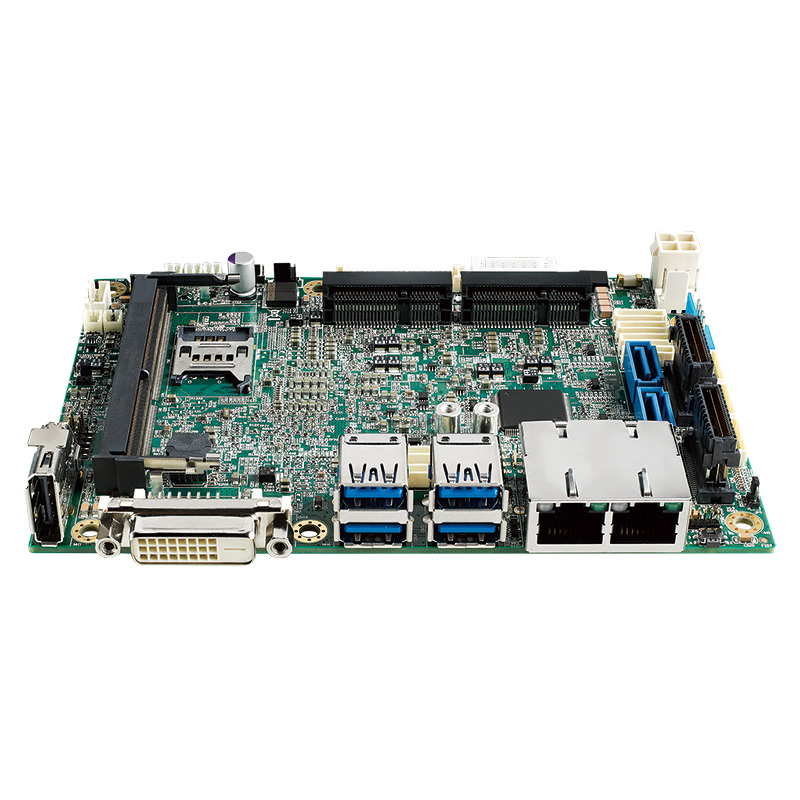
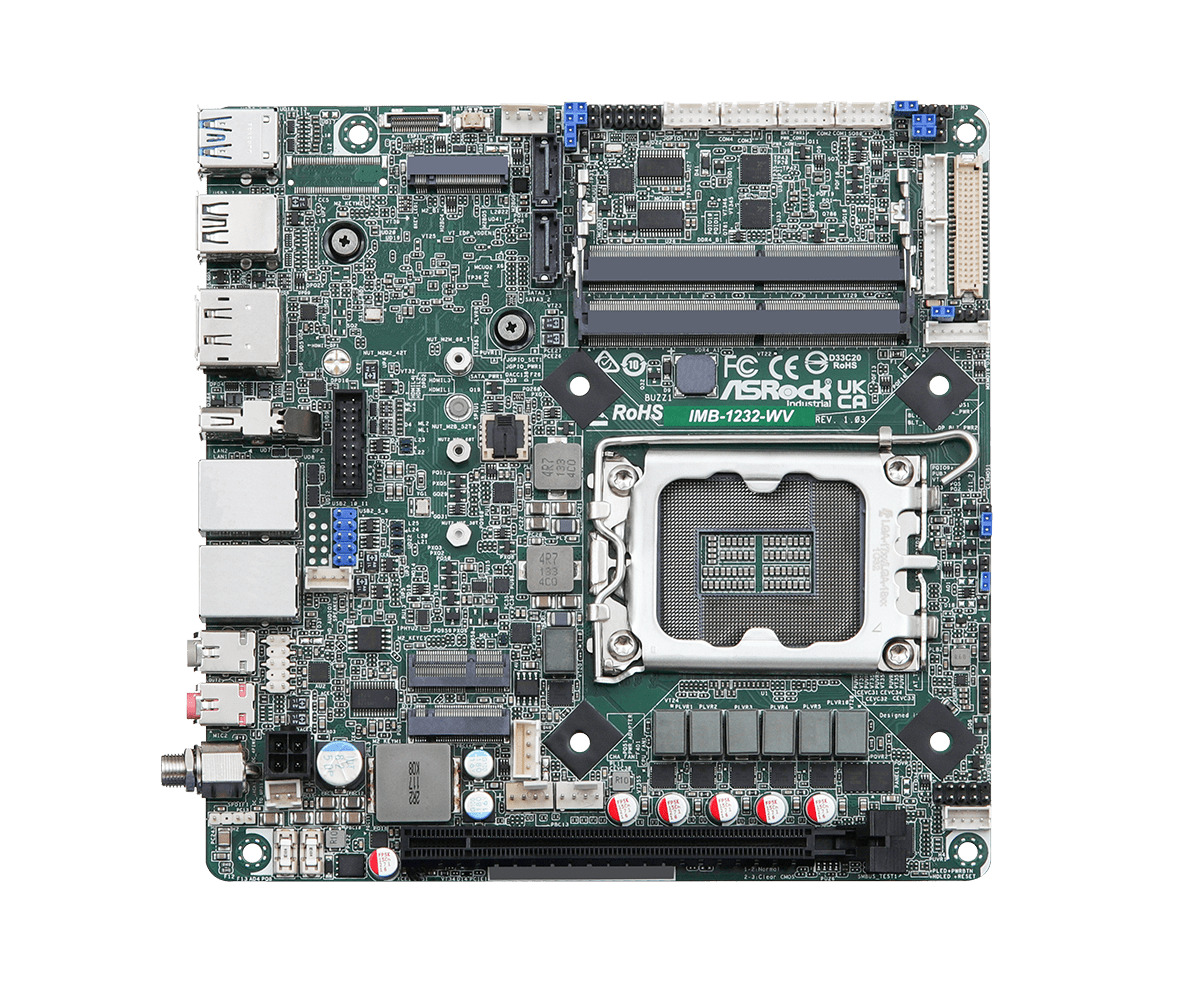
The term covers two kinds of board. Small embedded single board computers put everything on one compact board, often with the memory soldered down. Larger industrial motherboards, from Mini-ITX upwards, take socketed memory and full-size expansion cards and look much more like a PC board. Both are sold as embedded PC boards, and both are built into equipment that does one job, such as controlling touch screen kiosks, automating process lines, driving digital signage, supporting patient care and running AI in unmanned systems.
Choosing between them is mostly a question of the enclosure, the I/O, the heat the system can shed and how long the product must stay in production. This guide compares the form factors by name, sets out how an embedded board differs from a consumer one, shows how to choose by processor family, and ends with a checklist and the boards we build with most often.
Key takeaways
- 01Two families, one job
- Single board computers suit small fixed designs; Mini-ITX, Micro-ATX and ATX motherboards suit builds that need more memory, more displays or full-size PCIe cards.
- 02The form factor follows the enclosure
- Pick the format that fits the space, the I/O and the heat the enclosure can shed, then choose the processor within it.
- 03Embedded boards are built for long service
- Revision control, change notices, wide temperature ratings, DC inputs and multi-year availability set them apart from consumer boards.
- 04Processor family sets the power class
- Intel Atom and Processor N boards run cool and fanless; Core, Core Ultra and AMD Ryzen boards add performance, graphics and AI at higher power.
- 05Check the headers, not just the rear panel
- Serial, GPIO, LVDS or eDP and extra USB often sit on board-level headers that need cables and an I/O plate.
Embedded single board computers and industrial motherboards
Advantages of industrial motherboards and embedded SBCs
Three advantages set industrial boards apart from commercial ones, and they are the reasons most OEMs and system integrators choose them.
| Advantage | What it means in practice |
|---|---|
| Durability and reliability | Wide operating temperatures, fanless heat paths through heat spreaders or heatsinks, protection against shock and vibration, and wide-range DC inputs that ride through fluctuating power |
| Embedded roadmaps and supply continuity | A bill of materials fixed at the start of the project, on chipsets that makers commonly support for seven to 15 years, so field replacements and later rollouts match the first systems |
| Cost over the whole life | Boards configured with what the job needs and nothing it does not, a processor sized to the workload, and lower power draw that cuts running costs and allows fanless operation |
Durability matters because one point of failure is enough. Dust, damp, extended temperatures, repeated shock and vibration or an unstable supply can stop a standard computer that does not use industrial components or a proven configuration, and downtime in the field usually costs far more than the board. Commercial motherboards can become obsolete within about two years, while the long availability of embedded chipsets lets the makers of industrial PCs and boards offer the same model for years, so a product can be replaced or extended without hardware or software compatibility problems.
Embedded motherboard form factors compared
A form factor fixes a board’s outline, mounting holes and, on stackable formats, its expansion connectors, so enclosures, I/O plates and accessories can be designed around it. The table lists the formats used for embedded PC boards from the smallest to the largest. The names are the standard way to specify the size; the exact outline is in each specification, and we confirm it against the enclosure drawing before a board is chosen.
| Form factor | Board type | Typical processors | Typical power class | Memory | Expansion | Typical home |
|---|---|---|---|---|---|---|
| 1.8 inch Femto-ITX | SBC | Intel Atom x7000RE, Processor N, Core 3 N355 | Low, about 6–15 W | Soldered LPDDR5 | M.2 or headers only | Gateways, small OEM housings |
| 2.5 inch Pico-ITX | SBC | Intel Atom, Processor N and Core; Arm such as Qualcomm QCS6490 | Low to mid | Soldered or one SO-DIMM | One M.2 or Mini PCIe | Kiosks, portable medical devices, drones |
| 3.5 inch SBC | SBC | Intel Atom, Processor N, Core and Core Ultra; AMD Ryzen Embedded; Arm | Low to mid | Soldered or SO-DIMM | M.2, Mini PCIe, sometimes PCIe/104 | Industrial PCs, vehicles, test equipment |
| 4 inch EPIC | SBC | Intel Atom and Core; AMD Ryzen | Low to mid | Soldered or SO-DIMM | Several M.2 sockets | Gateways and controllers with heavy I/O |
| PC/104 family | Stackable SBC | Intel Atom and Core | Low to mid | Usually soldered | Stacked I/O, power and network boards | Defense, aerospace and transport |
| NUC and 4X4 boards | Compact motherboard | Intel Core and Core Ultra; AMD Ryzen and Ryzen AI | Mid, about 15–28 W | Two SO-DIMMs | M.2 sockets, USB4 or Thunderbolt | Signage, small edge AI, compact PCs |
| COM Express carrier | Module plus carrier | Intel Atom, Core and Xeon | Set by the module | On the module | Designed into the carrier | Rugged long-life products |
| Thin Mini-ITX | Motherboard | Intel Atom, Core and Processor N | Low to mid | SO-DIMM | One slot or M.2, low-profile I/O | Panel PCs, all-in-one displays, slim kiosks |
| Mini-ITX | Motherboard | Intel Processor N to Core Ultra; AMD Ryzen 8000 and AM5 | Low to high | SO-DIMM or DIMM | One PCIe slot plus M.2 | Box PCs, kiosks, vision and AI systems |
| Micro-ATX | Motherboard | Intel Core and Core Ultra desktop; AMD AM5 | Mid to high | Up to four DIMMs | Up to four PCIe slots | Automation and test systems |
| ATX | Motherboard | Intel Core, Core Ultra and Xeon; AMD AM5 and EPYC 4005 | Mid to high | Four DIMMs | Up to seven PCIe slots | Card-heavy automation, vision and rack systems |
The smaller SBC formats are covered in depth in our guide to what a single board computer is, so this guide concentrates on how to choose between the two families. Our explainer on motherboard form factors lists the PC formats in full, and what a motherboard is covers the parts every board shares.
Which form factor should I choose for an embedded system?
Start with the enclosure and the cards, not the processor. If the system needs a full-size GPU, frame grabber or several PCIe cards, it needs a motherboard with slots. If it has to fit behind a display, in a handheld instrument or on a DIN rail, an SBC or a Thin Mini-ITX board is usually the only option. Everything else sits between those two.
| If the build needs… | Look at | Why |
|---|---|---|
| The smallest possible board and low heat | Femto-ITX or Pico-ITX SBC | Small outline, soldered memory, fanless at low power |
| Lots of serial, CAN and digital I/O in a small box | 3.5 inch or EPIC SBC | Room for COM ports, GPIO and several M.2 sockets |
| A slim build behind a panel or display | Thin Mini-ITX | Low-profile I/O and board height, LVDS or eDP on board |
| Several displays and strong graphics in a compact PC | NUC or 4X4 board | Core Ultra or Ryzen with quad display output |
| One PCIe card and a standard enclosure | Mini-ITX | The most common industrial motherboard, with the widest choice |
| Several PCIe cards, GPUs or capture cards | Micro-ATX or ATX | Up to seven slots and desktop or EPYC processors |
| Stackable I/O in a rugged military system | PC/104 family | Boards stack without a backplane or cables |
| A custom I/O layout with a processor upgrade path | A module on a carrier board | Swap the module, keep the carrier |
The last row is worth a note. Where no standard board has the right connectors in the right places, a system on module on a custom carrier gives the product its own layout while the compute stays on a replaceable module, a pattern our comparison of SMARC, Qseven, OSM and COM Express explains.
Mini-ITX, Thin Mini-ITX and ATX industrial motherboards
Mini-ITX is the most common footprint for an industrial motherboard, and the format board makers have built for longest. It is small enough for a compact box PC yet takes a socketed desktop processor, two SO-DIMMs or DIMMs, an M.2 SSD and one PCIe card, and it has room on the rear panel for several display outputs, USB and COM ports. Our industrial Mini-ITX motherboards run from fanless Intel N97 and N150 boards to AMD AM5 boards for Ryzen 9000 and EPYC 4005 processors.
Thin Mini-ITX keeps the same outline but lowers the board and its I/O, with a reduced-height I/O plate and memory sockets laid flat, so it fits all-in-one displays and slim panel PCs where the installation leaves little height. Many Thin Mini-ITX boards add LVDS or eDP and a 12 to 24 V DC input, so they can drive a built-in panel straight from the board.
Micro-ATX and ATX boards are the choice when card count matters more than size. Our industrial ATX and Micro-ATX motherboards carry up to seven PCIe slots, six COM ports and several LAN ports, which suits automation, machine vision and test systems that hold a GPU, frame grabbers and I/O cards together. Where the job is a small server at the edge, server motherboards add Xeon processors, more memory channels and remote management.
| Thin Mini-ITX | Mini-ITX | Micro-ATX | ATX | |
|---|---|---|---|---|
| Typical processors | Atom, Processor N, Core U | Processor N to Core Ultra and Ryzen | Desktop Core, Core Ultra, Ryzen | Desktop Core, Core Ultra, Ryzen, EPYC 4005 |
| PCIe slots | None or one | One | Up to four | Up to seven |
| Memory | SO-DIMM | Two SO-DIMMs or DIMMs | Up to four DIMMs | Four DIMMs |
| Power input | Often 12–24 V DC | DC on embedded boards, ATX on socketed ones | ATX supply | ATX supply |
| Typical enclosure | Panel PC, all-in-one | Box PC, kiosk | Compact tower or wall-mount | 4U rack or large wall-mount |
Embedded single board computers in brief
Both kinds are printed circuit boards that host every part an embedded computer needs. Traditionally an SBC had everything soldered to one board, but add-on memory, storage, I/O and wireless cards have blurred that line, so we separate the two by form factor and, generally, by whether the processor is soldered or socketed. Below Mini-ITX the boards are normally called SBCs, and the formats are named after their size. The 1.8 inch Femto-ITX SBC is the smallest, typically with a couple of LAN ports, USB and an M.2 or Mini PCIe socket for wireless or extra storage beside onboard eMMC. The 2.5 inch Pico-ITX SBC was the original compact standard and brings out a wide range of board-level headers for flexible I/O in tight spaces.
The 3.5 inch SBC, once called the biscuit board, has room for more memory, LAN, USB, COM and display ports and for expansion through Mini PCIe, mSATA or M.2, and most come with a heat spreader or heatsink for fanless running across wide or extended temperature ranges. NUC and 4X4 motherboards pack Core, Core Ultra or Ryzen processors and four display outputs onto a very small board, which makes them popular in digital signage and broadcasting. PC/104 single board computers stack with I/O and power boards through their expansion connectors; the name comes from the 104 pins that join the original boards, and the family has been used in rugged and military systems for more than 30 years.
What is the difference between an embedded and a consumer motherboard?
A consumer motherboard is designed for a PC that will be upgraded or replaced within a few years, so it changes as soon as a cheaper part or a new chipset appears. An embedded board is designed to be built into a product that is certified, documented and supported for many years, so the priorities run the other way.
| Consumer motherboard | Embedded or industrial motherboard | |
|---|---|---|
| Supply life | Often a year or two before a new model | Usually several years, with processors from embedded roadmaps |
| Revision control | Components can change without notice | Fixed bill of materials, with change notices before a revision |
| End of life | Little or no warning | End-of-life notice and a last-time-buy window |
| Operating temperature | Typically 0 to 40 °C | 0 to 60 °C standard; −20 to 70 °C or wider on wide-temperature boards |
| Power input | ATX supply only | 12 V or wide-range DC such as 9–28 V or 9–36 V, with AT auto power-on |
| Industrial I/O | Few or no serial ports | RS-232/422/485, GPIO, LVDS or eDP, sometimes CAN |
| Management | Basic BIOS | Watchdog timer, TPM 2.0, hardware monitoring, customizable BIOS |
| Memory | Non-ECC desktop DIMMs | SO-DIMMs or soldered memory, with ECC or in-band ECC on many boards |
| Processors | Consumer SKUs | Embedded SKUs, often with an E suffix, and long-life AMD Ryzen Embedded parts |
Temperature is the difference that most often decides it. A board in a cabinet or a sealed enclosure sees the heat of its own processor and of everything around it, so the air inside can run well above the room. If a factory floor reaches 50 °C, a board rated to 50 °C has no margin once it is built into a cabinet, particularly a high-performance one. A wide-temperature board rated to 70 °C gives that margin. Cold is easier to manage, but check the cold start: a board rated from −20 °C should boot at −20 °C, not just keep running once warm. Our explainer on the industrial temperature range sets out the common ratings.
Serial ports and management features matter just as much in practice. A board with a watchdog timer can restart itself after a software hang without anyone on site, and AT power mode starts the system as soon as power returns after an outage, which an unattended machine needs.
How long are embedded motherboards available?
Embedded boards are built around processors on the chip makers’ embedded roadmaps. Intel’s embedded-use processors and AMD’s Ryzen Embedded parts are planned for long availability, often seven to ten years from launch, against a year or two for many consumer parts. The board maker then sets its own supply commitment, which is usually shorter than the processor’s but still runs to several years, and it keeps the board’s components and BIOS under revision control for that time.
Three things protect a long-life product in practice. A change notice tells you before any component on the board is revised, so the new revision can be checked against the old one. An end-of-life notice gives a window for a last-time buy, sized to cover the remaining production and spares. And a documented successor, ideally with the same footprint and I/O, shortens the requalification when the board finally changes.
| Stage | What happens | What to do |
|---|---|---|
| Launch | Board released on a current processor | Check the planned availability before designing it in |
| Production | Fixed BOM and BIOS; change notices for any revision | Record the board revision and BIOS version on every system |
| Revision | A component or BIOS change, announced in advance | Validate the new revision against your image and application |
| End of life | Notice of withdrawal and a last-time-buy date | Buy for the remaining production and spares, or move to the successor |
We track these notices for the boards we supply and plan replacements with customers before stock runs out.
Choosing an embedded motherboard by processor family
Once the form factor is set, the processor decides the performance, graphics, power draw and how long the board will be made. Intel and AMD both build embedded lines for this, and Arm processors fill the low-power end. The table sets out the families we build with most often and what each suits.
| Processor family | Typical power class | Strengths | Typical boards |
|---|---|---|---|
| Intel Atom x7000 (Amston Lake) and Processor N | About 6–15 W | Fanless, low cost, in-band ECC on Atom; Windows and Linux | Femto-ITX, Pico-ITX, 3.5 inch, Mini-ITX |
| Intel Atom x6000 (Elkhart Lake) | About 5–12 W | Real-time features (TCC), in-band ECC, wide temperature | 3.5 inch, EPIC, Thin Mini-ITX |
| Intel Core Series 3 (Wildcat Lake) | About 15 W | Current low-power Core with Xe graphics and DDR5 | Pico-ITX, Mini-ITX |
| Intel 13th and 14th Gen Core and Bartlett Lake | 15–65 W | Socketed or soldered; E-suffix embedded parts | Mini-ITX, Micro-ATX, ATX, 3.5 inch |
| Intel Core Ultra Series 2 and 3 | 15–65 W and up | NPU for AI, Arc graphics, PCIe 5.0 on desktop parts | NUC, Mini-ITX, Micro-ATX, ATX, 3.5 inch |
| AMD Ryzen Embedded V2000, V3000 and R2000 | About 10–54 W | Strong graphics, four displays, long planned availability | Mini-ITX, 3.5 inch, EPIC |
| AMD Ryzen 8000 and Ryzen AI 300 | 15–54 W | RDNA 3 or 3.5 graphics, NPU, ECC on many boards | Mini-ITX, 4X4 |
| AMD Ryzen 9000 and EPYC 4005 (AM5) | 65–170 W | High core counts, ECC, PCIe 5.0 | Mini-ITX, Micro-ATX, ATX |
| Arm: NXP i.MX, Rockchip, Qualcomm | A few watts | Low power, integrated NPUs, Linux or Android | Pico-ITX, 3.5 inch, Raspberry Pi format |
On the Intel side, Amston Lake Atom x7000 and Intel Processor N boards are the default for fanless controllers and gateways, Elkhart Lake motherboards remain a common choice where real-time timing matters, and the newer Wildcat Lake Core Series 3 boards bring a current low-power Core to the same small formats. Raptor Lake and Bartlett Lake cover socketed and soldered Core processors up to 65 W, and Intel Core Ultra boards add an NPU for on-device AI; our guide to Intel Core Ultra explains the series.
On the AMD side, AMD embedded motherboards and AMD Ryzen SBCs are chosen for their integrated graphics, often driving four displays without a graphics card, and for AMD’s long planned availability on Ryzen Embedded parts. Our guide to the benefits of AMD Ryzen Embedded boards goes further. For the low-power end, Arm SBCs on NXP, Rockchip and Qualcomm processors run Linux or Android at a few watts, and our comparison of x86 and Arm sets out when that trade makes sense.
Generation names and suffixes can be confusing. Our guide to CPU generations and embedded processors explains how to read them, and our explainer on TDP shows how a processor’s power figure translates into the cooling a board needs.
Intel embedded vs AMD embedded boards
Both makers build long-life embedded lines, so the choice between them usually comes down to the workload. Intel’s portfolio is the broader one, and our Intel single board computers run from Atom and Processor N parts for compact, energy-sensitive equipment to Core and Core Ultra for vision and AI; Intel also brings features such as Time Coordinated Computing for deterministic timing and vPro for remote management on selected chipsets. AMD’s Ryzen Embedded and Ryzen 8000 boards offer strong multi-core performance and integrated Radeon graphics, which suit multi-screen signage, medical imaging and HMIs that would otherwise need a graphics card.
| Intel embedded boards | AMD embedded boards | |
|---|---|---|
| Range | Atom, Processor N, Core, Core Ultra, Xeon | Ryzen Embedded, Ryzen 8000 and AI 300, AM5 Ryzen and EPYC 4005 |
| Graphics | Intel UHD, Xe and Arc | Radeon Vega, RDNA 2 and RDNA 3 |
| Displays | Three or four on most boards | Four on many boards |
| AI acceleration | NPU on Core Ultra | NPU on Ryzen 8000 (some models) and Ryzen AI 300 |
| Real-time and management | TCC on selected parts, vPro on Q and W chipsets | Fewer real-time features; DASH on some PRO parts |
| Memory integrity | In-band ECC on Atom and many Core parts | ECC SO-DIMMs on many Ryzen boards |
In practice we benchmark the application on candidate boards where performance is close. Comparing CPU scores on the real workload often shows that a lower-power processor runs it reliably, which saves heat, cost and fan noise without sacrificing the performance the application needs.
Thermal design: fanless boards, heatsinks and heat spreaders
Moving parts are the most common point of failure in industrial computers. A fan draws dust into the enclosure, the dust clogs the fan and the heatsink, and the system overheats. Removing the fan removes that failure, which is why most embedded boards are specified for fanless running wherever the processor’s power allows, as our guide to active vs passive cooling explains.
| Cooling approach | How it works | Suits |
|---|---|---|
| Board heatsink | Finned heat sink on the processor, cooled by convection inside the case | Low-power boards in ventilated enclosures |
| Heat spreader | Flat plate on the processor that bolts to the enclosure wall | Sealed and conduction-cooled builds, SBCs and COM Express |
| Fanless chassis | The whole enclosure is the heatsink, with heat pipes from the processor | Box PCs and panel PCs up to mid-range power |
| Active cooling | Fan on the heatsink or in the case | High-power desktop processors and GPUs |
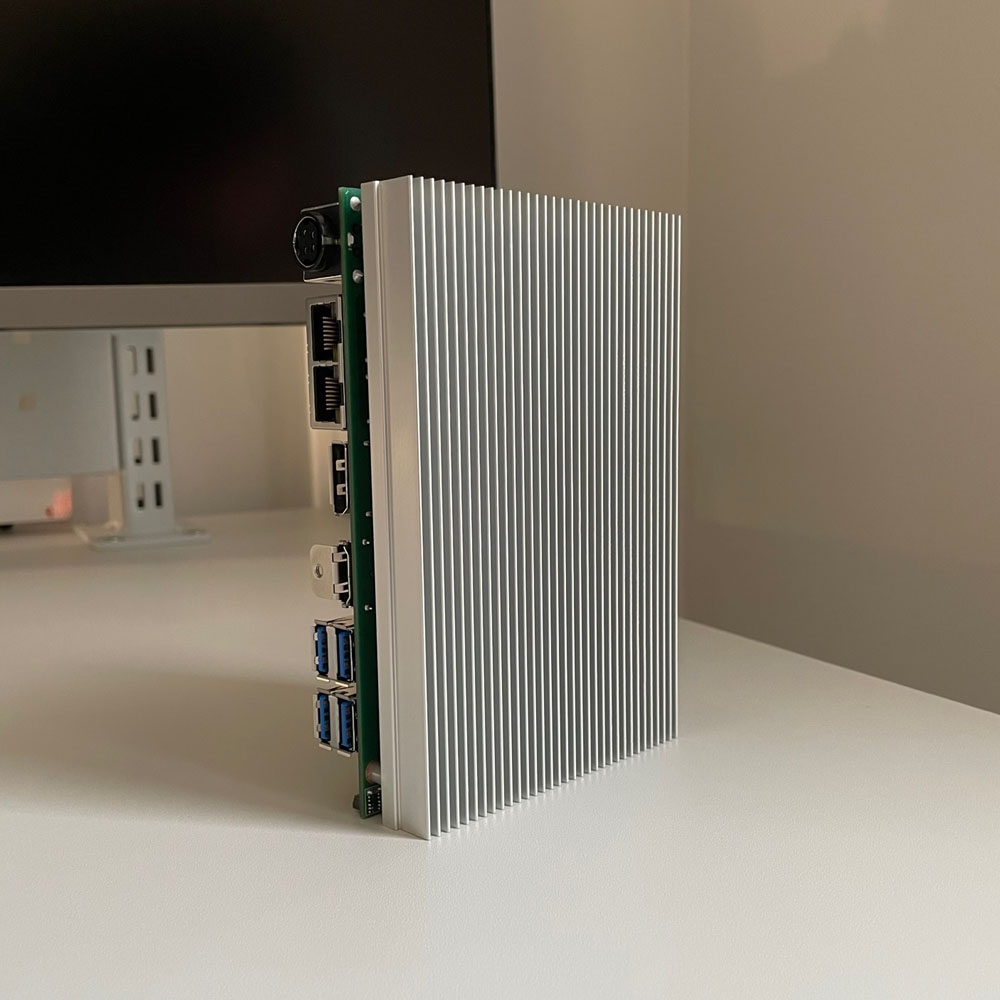
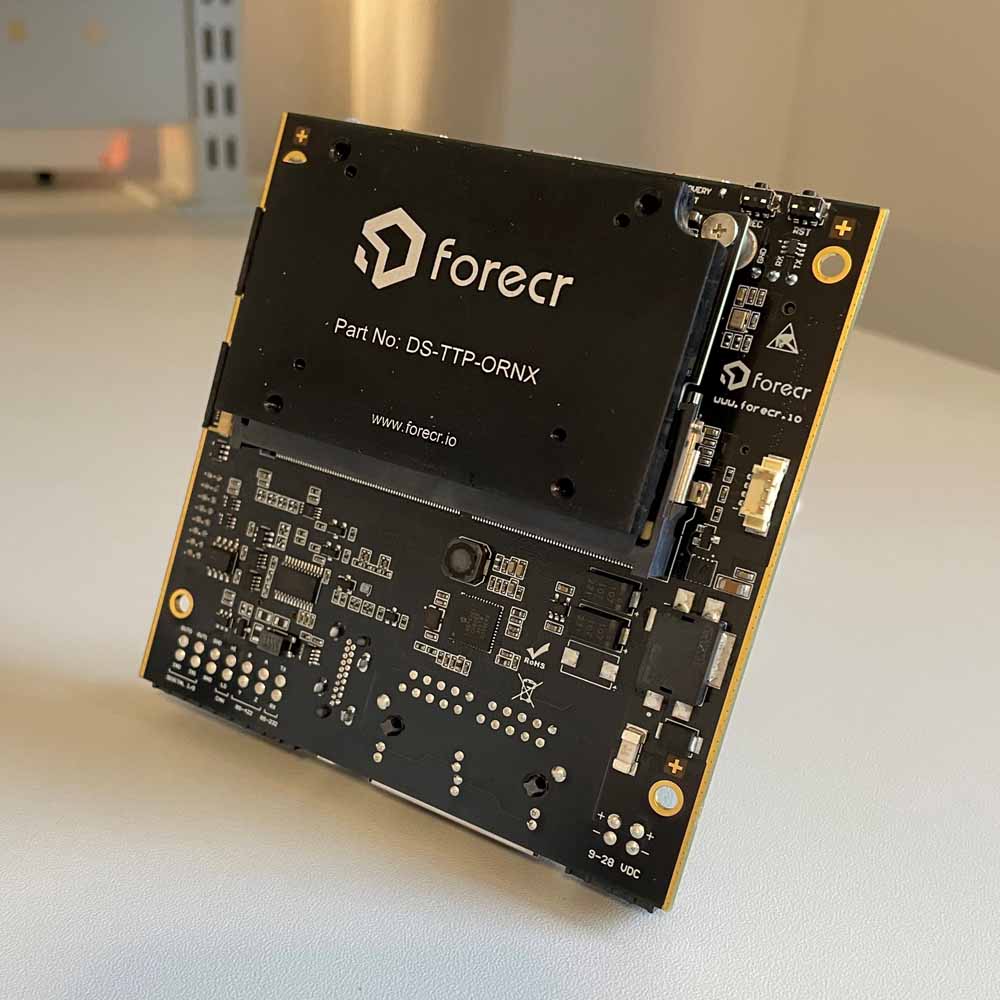
A finned heatsink spreads the heat from the processor into the air around it, and other hot parts, such as video capture cards and fast NVMe SSDs, may need one too. But a heatsink still needs air. Inside a compact enclosure, every component that makes heat raises the air temperature, which recreates the problem the heatsink was meant to solve, so the heat has to reach the outside of the enclosure. A heat spreader does that by conduction: an aluminum plate on the processor is bonded to the enclosure wall, which becomes the heatsink, the same way a fanless box PC works. Most embedded SBCs offer a heat spreader, and bespoke ones can be made for a project.
Size the cooling against the processor’s sustained power, not its base figure, and against the hottest air inside the enclosure rather than the room. A board that is too hot does not usually fail at once; it slows itself down until the temperature falls, which shows up as lost performance rather than a fault.
Heatsink or heat spreader
Two ways to cool an embedded board without a fan.
-
01

Embedded SBC with heatsink
Finned heatsink cooled by the air inside the enclosure.
-
02
Embedded board with heat spreader
Flat plate that conducts heat to the enclosure wall.
Power input, I/O headers and display connectors
Industrial boards connect to sensors, PLCs, scanners, printers, cameras and displays, and the data sources and buses in a project usually define the I/O and, with it, the footprint of the board. Not every port reaches the rear panel. On small boards many interfaces sit on board-level headers that need a cable to a panel connector, so check the datasheet for the connector type of every port the project needs, and check that the port carries enough bandwidth for the job.
| Interface | Where it usually sits | What to check |
|---|---|---|
| DC power | Rear jack, terminal block or 4-pin header | Input range, AT power-on mode, reverse polarity protection |
| Serial ports | Rear DB9 or internal headers | RS-232/422/485 selection, ccTalk or TTL options, isolation |
| GPIO and digital I/O | Internal header | Voltage level, count, isolation where wired to field equipment |
| Ethernet | Rear RJ45 | Controller (Intel for driver support), 2.5GbE, TSN where timing matters |
| USB | Rear panel plus internal headers | Enough ports for touch, cameras, scanners and keys |
| Display | HDMI and DisplayPort on the rear; LVDS or eDP on headers | Number of independent displays, panel interface and backlight control |
| Audio | Rear jacks or header | Line-out and mic-in for kiosks and intercoms |
Some installations are completely headless and need no display at all. Others drive one or more screens, and here embedded display connectors matter. HDMI and DisplayPort connectors take up a lot of board edge, especially for multiple displays, and they cannot drive a bare TFT LCD panel directly. LVDS and eDP headers can, which is why machine builders and OEMs who design their own front panels choose boards with them: they control the look of the product and avoid the cost of a separate display controller.
Expansion: M.2, Mini PCIe and PCIe slots
Check expansion sockets the same way as I/O. A Mini PCIe or M.2 connector can be physically right for a card while carrying the wrong bus, so a card that fits may still not work. The socket’s key, its length and the signals behind it all have to match the module.
| Socket | What it can carry | What to check |
|---|---|---|
| M.2 Key M | NVMe or SATA SSDs | PCIe generation and lanes, SATA support, length such as 2242 or 2280 |
| M.2 Key B | 4G or 5G modems, some SATA SSDs | USB or PCIe signals, SIM slot on the board |
| M.2 Key E | Wi-Fi and Bluetooth modules | PCIe or CNVi, which differ between Intel modules |
| Mini PCIe | Wi-Fi, modems, I/O cards, mSATA on some sockets | Full or half size, USB or PCIe signals |
| PCIe slot | GPUs, frame grabbers, network and I/O cards | Lanes wired to the slot, generation, power for the card |
Our guide to M.2 key types explains which modules fit which socket, and our explainer on PCIe generations covers lane counts and bandwidth for card-heavy builds.
Memory, storage and data integrity
Embedded boards use SO-DIMMs, full-size DIMMs or memory soldered to the board. Soldered memory resists shock and vibration and keeps the board thin, but it fixes the capacity for the life of the product, so order the size the application will need in five years, not today. Socketed memory allows upgrades and second sources. Our comparison of DDR4 and DDR5 explains which processors use which.
Many embedded processors support error-correcting memory. Atom, Processor N and many Core parts offer in-band ECC, which protects ordinary memory at a small cost in capacity and bandwidth, while Ryzen and AM5 boards often take ECC SO-DIMMs or DIMMs. Our guide to ECC RAM sets out when that protection is worth having. For storage, eMMC on the board holds a small operating system with nothing to work loose, while M.2 NVMe and SATA SSDs carry larger images, logs and video. Industrial-grade flash rated for the write load and temperature is the safe default.
Firmware, security and remote management
The BIOS is where an embedded board becomes a product. Boot order, power-on after power loss, watchdog behavior, serial port modes and the display panel are all set there, and embedded board makers can customize and lock it, including a custom splash screen and fixed defaults that survive a battery change. Our explainer on what a BIOS is covers the basics, and we lock these settings as part of every build.
| Feature | What it does | Why it matters in embedded use |
|---|---|---|
| TPM 2.0 | Stores keys and measures the boot process | BitLocker, secure boot and Windows 11 support |
| Watchdog timer | Restarts the system if software stops responding | Unattended recovery without a site visit |
| Intel vPro or DASH | Out-of-band management on supported chipsets | Remote power control and repair |
| Hardware monitoring | Reports temperatures, voltages and fan speeds | Early warning before a failure |
| Custom BIOS | Fixed defaults, splash screen, locked settings | Every system in a fleet behaves the same |
Worked example: a board for a self-service kiosk
A kiosk maker needs a controller for a new ticket machine with a 21.5 inch touch display, a receipt printer, a card reader and a barcode scanner, in a steel housing that sees 40 °C in summer. The product will be made for seven years.
| Requirement | What it implies | Choice |
|---|---|---|
| Built-in LCD panel | eDP or LVDS on the board, with backlight control | Mini-ITX board with an eDP or LVDS header |
| Printer, card reader and scanner | Several serial ports and spare USB | Board with four or more COM ports on headers |
| Windows application | x86 processor, Windows 11 IoT Enterprise | Intel Core Series 3 or Processor N |
| Warm, sealed housing | Fanless, wide-temperature rating with margin | 15 W processor, −20 to 70 °C board |
| Mains-powered cabinet with a 24 V rail | Wide DC input | 9–28 V DC input |
| Seven-year production run | Embedded processor and board with change notices | Board on an embedded roadmap, revision tracked |
A board such as the ASRock Industrial IMB-1254E-WV ticks each row: a Core 3 304 at 15 W, LVDS or eDP, four COM headers, a 9 to 28 V DC jack and a −20 °C rating, which we would confirm against the enclosure’s internal temperature before building the first system.
Embedded motherboards and SBCs in our range
Industrial motherboards and single board computers by form factor and processor.
Mini-ITX motherboards
The most common industrial board, from fanless Intel N150 to AMD AM5.
View range
ATX and Micro-ATX
Up to seven PCIe slots for GPUs, capture and I/O cards.
View range
NUC and 4X4 boards
Core Ultra and Ryzen AI on a compact board with four displays.
View range
AMD motherboards
Ryzen Embedded, Ryzen 8000 and AM5 boards with strong graphics.
View range
3.5 inch SBCs
The most common SBC format, with full serial and network I/O.
View range
PC/104 SBCs
Stackable boards for rugged military and transport systems.
View rangeEmbedded boards from our range
These boards show the spread from a compact controller to a card-carrying automation board. We fit memory, storage and wireless, configure the BIOS, image the operating system and application, and test each board before it ships, or build it into a complete enclosure where the project needs one.
| Form factor | Example from our range | Key facts |
|---|---|---|
| Mini-ITX, low power | ASRock Industrial IMB-1254E-WV | Intel Core 3 304, in-band ECC, four COM headers, 9–28 V DC |
| Mini-ITX, AMD | ASRock Industrial IMB-A8000V | AMD Ryzen 5 8640U, four DisplayPort, ECC, 12–28 V DC |
| Thin Mini-ITX | Avalue EMX-EHLP-X25RE-A1R | Intel Atom x6425RE, in-band ECC, 4× 2.5GbE, six COM |
| NUC board | ASRock Industrial NUC-325 | Intel Core Ultra 5 325, 47 TOPS NPU, in-band ECC, 12–24 V DC |
| Micro-ATX | ASRock Industrial IMB-1317 | Core Ultra Series 2, two PCIe 5.0 x16 slots, six COM |
| ATX | ASRock Industrial IMB-A1700 | AMD EPYC 4005 or Ryzen 9000, seven PCIe slots, ECC |
For a complete computer rather than a bare board, the same processors appear in our embedded box PCs.
Embedded motherboards
Five boards from the table: two Mini-ITX boards on Intel and AMD, a Thin Mini-ITX board, a Core Ultra NUC board and a Micro-ATX board for card-heavy builds.
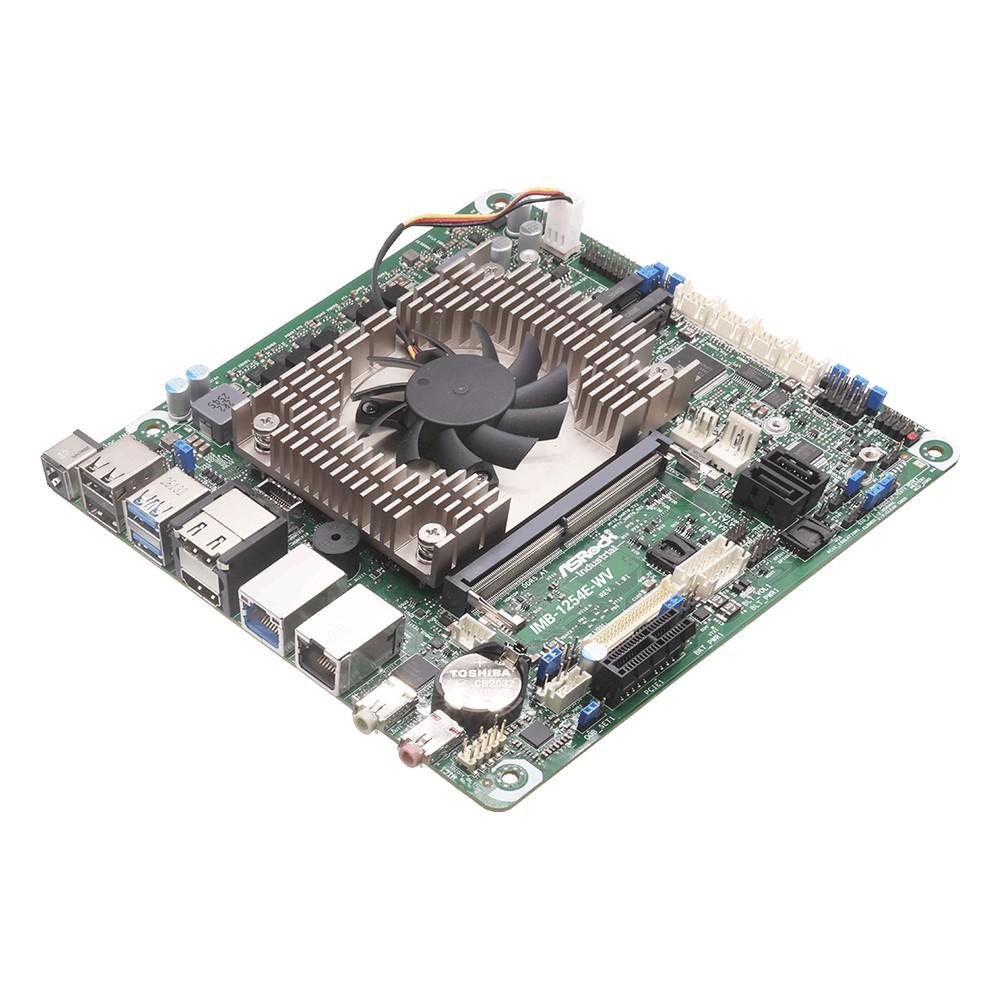
Intel Core 3 304 Mini-ITX SBC with In-Band ECC, Triple Display and 9-28V DC
- CPU
- Intel Core 3 (Wildcat Lake)
- Ethernet
- 1× 2.5GbE, 1× GbE
- Temp
- −20 to +70 °C
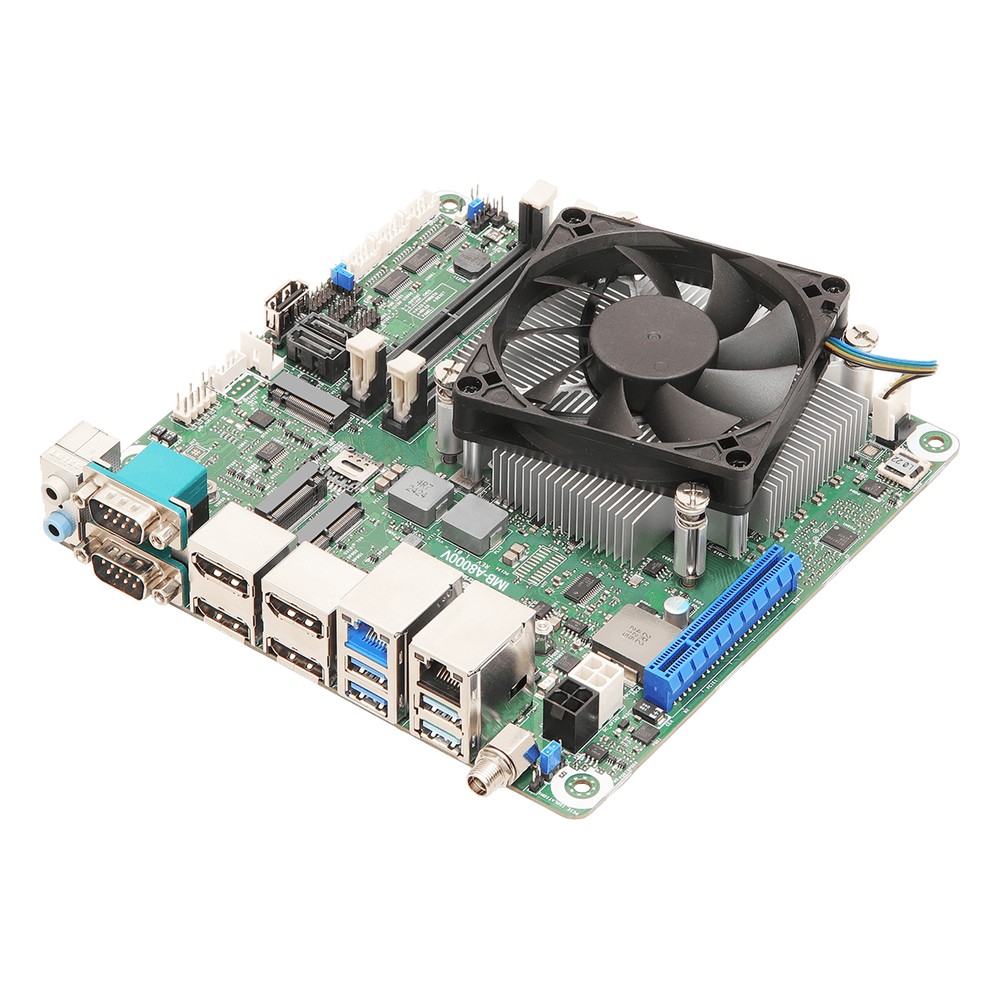
AMD Ryzen 5 8640U Mini-ITX Embedded Board with ECC, Quad Display and 12-28V DC
- AI
- 16 TOPS
- CPU
- AMD Ryzen Embedded 8000
- Ethernet
- 1× 2.5GbE, 1× GbE
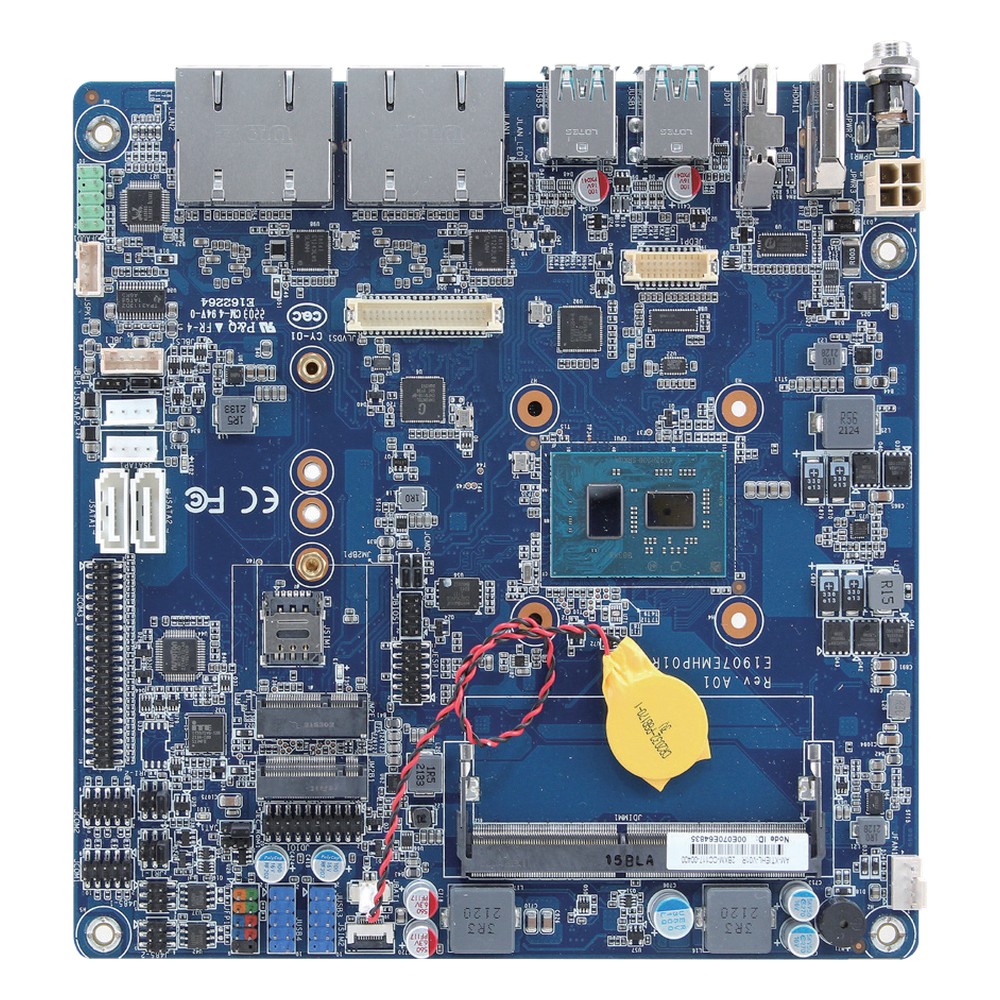
Quad-Core Intel Atom x6425RE Thin ITX Motherboard with 12 to 24 V DC Input, Quad 2.5GbE and -20 to 60 °C
- CPU
- Intel Atom x6425RE (Elkhart Lake)
- Ethernet
- 4× 2.5GbE
- Temp
- −20 to +60 °C
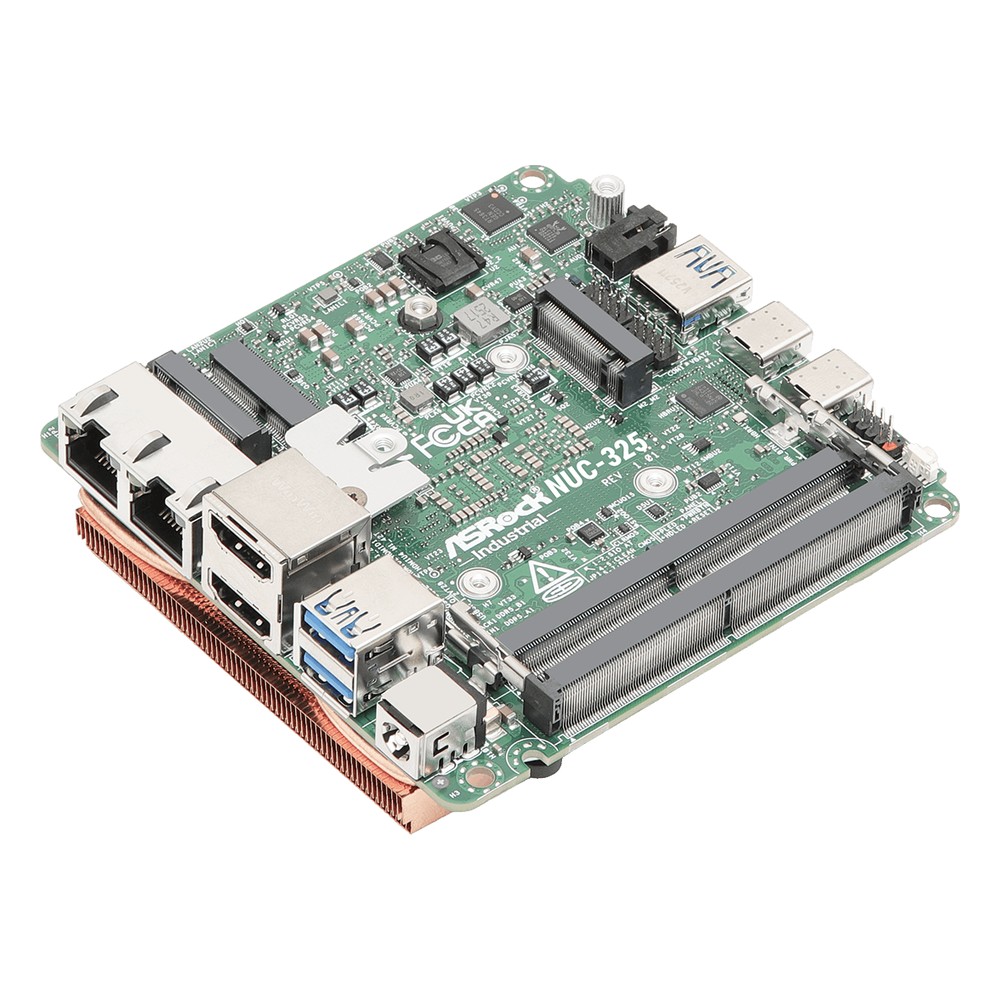
Intel Core Ultra 5 325 NUC Motherboard with ECC, Quad Display and Dual 2.5GbE
- AI
- 47 TOPS
- CPU
- Intel Core Ultra 3 (Panther Lake)
- Ethernet
- 2× 2.5GbE
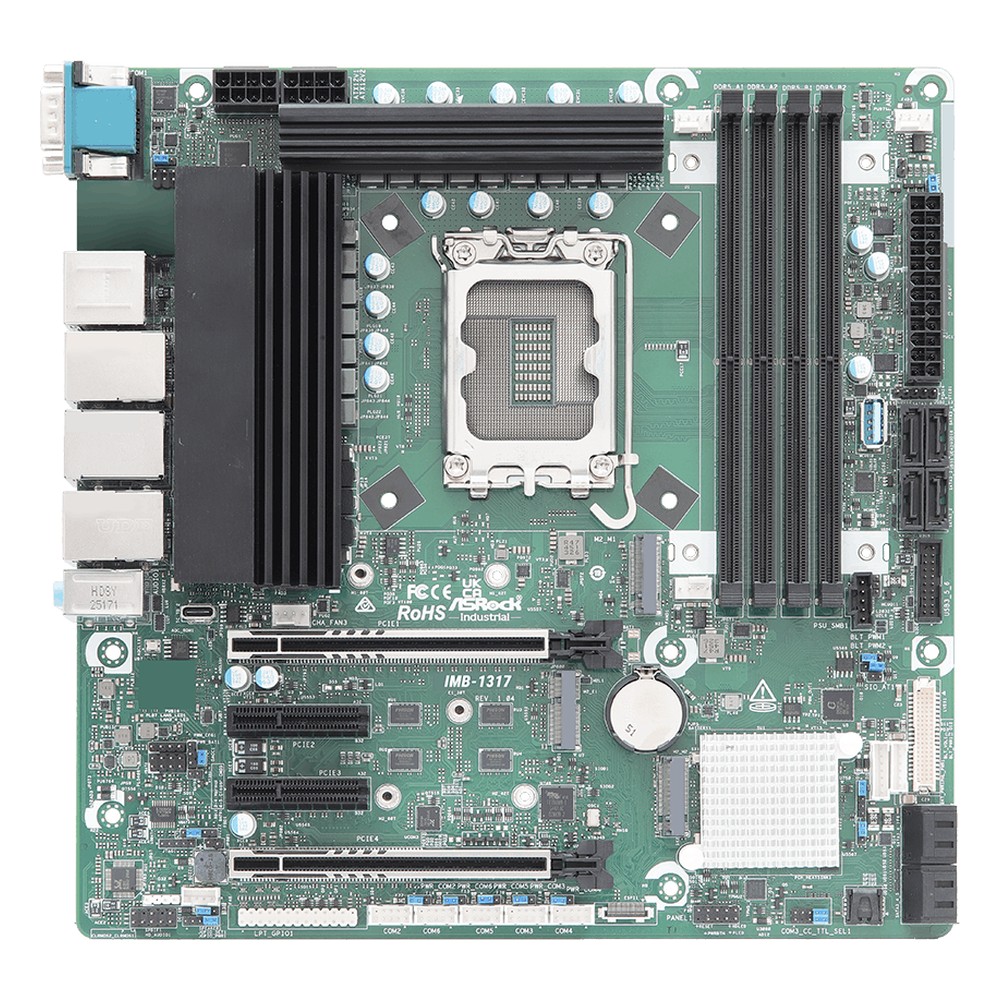
Intel Core Ultra Series 2 Q870 Micro-ATX Embedded Motherboard with 2.5GbE, Dual Thunderbolt 4 and 6x COM
- AI
- 13 TOPS
- CPU
- Intel Core Ultra 2 Arrow Lake-S
- Ethernet
- 1× 2.5GbE, 1× GbE
How we turn an embedded board into a deployed system
A board is the start of a project. These are the steps we take before it goes into your equipment.
-
Specify
Board and I/OMatch the form factor, processor, I/O, temperature rating and power input to the enclosure and the application.
-
Build
Memory and storageFit memory, industrial SSDs, wireless or cellular modules, heatsinks, I/O plates and cable sets.
-
Configure
BIOS settingsSet boot order, power-on mode, watchdog, serial modes and the display panel, then lock the defaults.
-
Image
OS and applicationInstall Windows IoT Enterprise, Linux or your own image, with drivers and the application.
-
Test
Load and thermalsCheck every interface and run the application under load in the target enclosure.
Specifying an embedded board
Nine questions to answer before a board is chosen.
-
01
I/O count
How many serial, USB, LAN, GPIO and CAN connections, and which must reach the panel?
-
02
Displays
How many screens, and does a built-in panel need LVDS or eDP?
-
03
Storage
eMMC, M.2 NVMe or SATA, and how much write endurance does the application need?
-
04
Expansion
Which M.2 keys, Mini PCIe sockets or PCIe slots must the modules and cards use?
-
05
Power
What supply is on site, and is a wide DC input or AT power-on needed?
-
06
Temperature
What is the hottest air inside the enclosure, with margin, and can the board run fanless there?
-
07
Certifications
Does the end product need CE, FCC, medical, rail or other approvals?
-
08
Operating system
Windows IoT Enterprise, a Linux distribution or a vendor BSP, and who maintains it?
-
09
Lifecycle
How long must the board be available, and will you be told before it changes?
Embedded motherboards: common questions
Quick answers
What is an embedded motherboard?
A board built into a machine or device rather than a desktop PC. It carries the processor, memory, storage interfaces and I/O, with a stable bill of materials, wide temperature ratings, DC power and long supply life.
What is the difference between an industrial and a consumer motherboard?
Supply life, revision control and ratings. Industrial boards stay in production for years with change notices, run across wider temperatures and add serial ports, DC inputs, watchdogs and customizable BIOS.
Which form factor should I choose for an embedded system?
The one that fits the enclosure and the cards. SBCs suit small fixed designs, Thin Mini-ITX suits slim panel builds, Mini-ITX suits one-card systems and Micro-ATX or ATX suits builds with several PCIe cards.
How long are embedded motherboards available?
Usually several years. Processors on embedded roadmaps are often planned for seven to ten years, and board makers commit to their own supply period with change and end-of-life notices.
What is a 3.5 inch SBC?
The most common industrial single board computer format. It has room for a full set of serial, USB, LAN and display I/O and is often cooled through a heat spreader.
What is an embedded PC board?
Another name for an embedded motherboard or SBC. It is the board-level computer at the heart of an embedded system, supplied bare or built into an enclosure.
Can I use a desktop motherboard in an industrial machine?
It will work, but it is a risk over the product’s life. Desktop boards change without notice, are rated for office temperatures and lack DC inputs, serial ports and watchdogs.
Embedded motherboard FAQs
-
What Is a Motherboard?
A motherboard is the main circuit board in a computer. It carries the processor socket, memory slots, chipset, firmware and power circuitry, and it links storage, expansion cards and every external port so the parts work together as one system.
-
What Is a Motherboard Form Factor?
A motherboard form factor is the standard that fixes a board’s size, mounting holes, rear I/O area and slot positions, so it fits matching cases and power supplies. The main motherboard sizes are ATX, Micro-ATX and Mini-ITX, with smaller embedded sizes such as 3.5-inch, Pico-ITX and PC/104.
-
What Is a Motherboard Chipset?
A motherboard chipset is the support chip that connects the processor to most of the board’s other features, such as USB, SATA, extra PCIe lanes, networking and audio. It decides how many ports and expansion slots a board can offer, which processors it accepts and which platform features, such as remote management, are available.
-
What Is a BIOS?
A BIOS (basic input/output system) is the firmware stored on a chip on the motherboard that runs first when a computer powers on. It tests the hardware, sets up the processor, memory and devices, then hands over to the operating system. On current computers the BIOS is UEFI firmware, but the name has stuck.
-
What Is a Watchdog Timer?
A watchdog timer (WDT) is a hardware countdown that resets a computer or microcontroller if its software stops responding. Healthy software restarts the countdown at regular intervals. If the software hangs and the timer reaches zero, the watchdog triggers a reset, so an unattended system recovers by itself instead of waiting for someone to restart it.
-
What Is LVDS?
LVDS (low-voltage differential signalling) is a way of sending high-speed digital data over pairs of wires using a small voltage difference of about 350 mV. It is defined in TIA/EIA-644. Its best-known use is the internal link between an embedded board and an LCD panel, although newer designs are moving to eDP.
-
What Is the Industrial Temperature Range?
The industrial temperature range is −40 to 85 °C: the grade an electronic component must operate across to be called industrial, compared with 0 to 70 °C for commercial parts. Rugged computers built from industrial-grade components typically run from −25 or −40 °C up to 70 °C as a complete system.
Choosing an embedded motherboard?
Tell us about the enclosure, the I/O, the displays and how long the product must stay in production. We will recommend the form factor and processor, then configure, image and test the board before it ships.