
 UK
UK Segmentation with VLANs
IEEE 802.1Q VLANs separate traffic types, such as control, video, telemetry and business traffic, across one physical network, so a broadcast storm or a compromised device stays inside its own segment.
Your Quote List ()
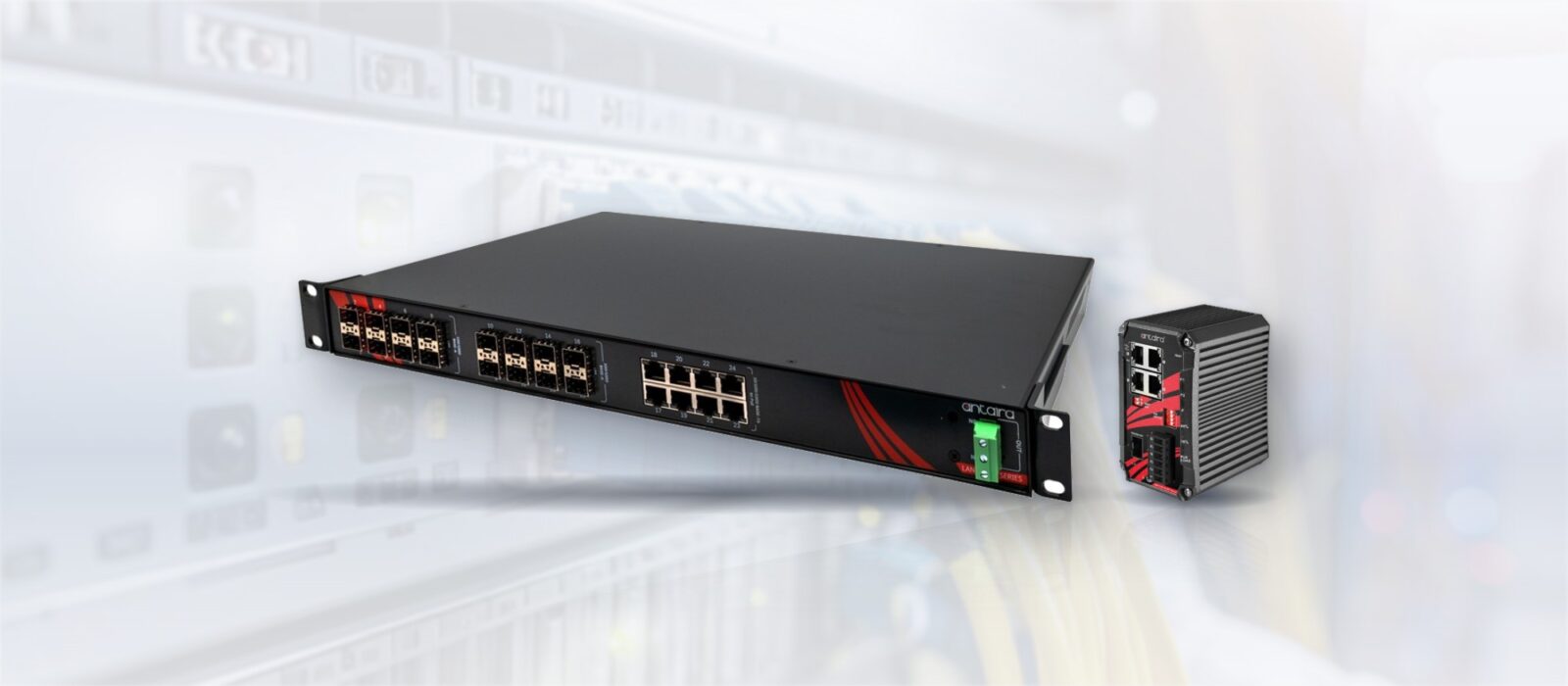
An unmanaged switch is plug-and-play; a managed switch adds VLANs, QoS, redundancy, monitoring and security. This guide compares managed, smart and unmanaged industrial switches and shows when each is the right choice.
The managed vs unmanaged switch decision comes down to control: an unmanaged switch forwards Ethernet frames between its ports with nothing to configure, while a managed switch lets you segment, prioritise, protect and monitor that traffic through a web interface, a command line or SNMP. Both move data at the same wire speed. The difference is what you can make the network do, and what you can see when something goes wrong.
It is one of the first decisions in any industrial network, and it quietly sets what that network can and cannot do later. An unmanaged industrial switch forwards everything, as fast as it can, with no settings to get wrong. A managed industrial switch lets you decide how traffic is separated, which traffic goes first, how the network recovers from a broken cable and who is allowed to connect, at the cost of having to set it up and keep the configuration.
This guide compares the two, and the smart or web-managed switches that sit between them, feature by feature. It explains the failure modes that push industrial networks towards managed switching, broadcast storms, multicast floods and loops, sets out redundancy and security in figures, and ends with a decision table, a checklist and examples from our range. The aim is to match the switch to the deployment rather than defaulting to one or the other.
Switch makers use three broad tiers. Unmanaged switches have no configuration. Smart switches, also called web-managed or lightly managed switches, add a web page with a subset of features. Fully managed switches add the complete feature set, usually with a command line and SNMP as well as the web interface. The table compares what industrial buyers typically get at each level; exact features vary by model, so check the datasheet.
| Capability | Unmanaged | Smart (web-managed) | Managed |
|---|---|---|---|
| Configuration | None, plug and play; some models have DIP switches | Web interface | Web interface, CLI, SNMP, often a configuration backup port |
| VLANs (IEEE 802.1Q) | No | Usually port-based VLANs | Port, tag, protocol and subnet-based VLANs, up to 4,094 IDs |
| Quality of service | Best effort, or fixed priority by DIP switch | IEEE 802.1p priority | 802.1p and DSCP, several queues, rate limiting |
| IGMP snooping | No, multicast floods every port | Often basic snooping | Snooping, querier and multicast filtering |
| Loop protection and redundancy | None; a loop can stop the network | STP or RSTP on some models | STP, RSTP, MSTP and ring protocols such as ITU-T G.8032 ERPS |
| Link aggregation | No | Static on some models | Static and LACP (IEEE 802.1AX) |
| Monitoring | Link LEDs, sometimes a relay alarm | Port status page | SNMP v1/v2c/v3, RMON, syslog, port mirroring, LLDP |
| Access security | Open ports | Port enable and disable | 802.1X, ACLs, MAC limits, DHCP snooping, RADIUS and TACACS+ |
| Layer 3 | No | No | Static routes on Layer 2+ models; full routing on Layer 3 switches |
| Typical industrial role | Small fixed cabinet or machine network | Small segmented networks with light needs | Cell, line, ring and backbone switching; anything monitored remotely |
For the routing column, our guide to Layer 2 vs Layer 3 switches explains what Layer 2+ and Layer 3 add. Every switch in the table still does the same basic job, which our FAQ on what an Ethernet switch is describes, and none of them repeats traffic to every port the way an old hub did; see network hub vs switch.
An unmanaged switch is fixed-function: you plug devices in and it forwards traffic between them, learning which device sits on which port and treating every frame the same way. There is nothing to configure and nothing to monitor beyond the link lights. That simplicity is a strength in the right place.
A managed switch exposes a configuration layer, a web interface, a command line and usually SNMP, through which you set up VLANs, quality-of-service rules, redundancy protocols and monitoring. It does everything an unmanaged switch does, and then gives you the controls to shape the network around the application. Our FAQ on what a managed switch is gives the short version.
An unmanaged switch is a plug-and-play Ethernet switch with a fixed configuration. Every port is in one network, every frame is forwarded on a best-effort basis, and there is no interface for VLANs, monitoring or loop protection. Industrial unmanaged switches add a sealed metal case, a wide DC input, a wide temperature rating and often redundant power inputs with a relay alarm, but the switching itself stays fixed. A few add DIP switches for broadcast storm protection or port priority, which is as far as configuration goes.
A smart switch, sometimes sold as web-managed or lightly managed, is a managed switch with a reduced feature set and usually only a web interface. It typically covers port-based VLANs, basic QoS and port mirroring, which suits a small segmented network. It often lacks the ring redundancy, SNMP v3 monitoring and access security that industrial networks rely on, so treat it as a managed switch with gaps and check each feature you need against the datasheet.
Above fully managed Layer 2 sit switches with some routing. Layer 2+ and light Layer 3 models add static routes and DHCP Option 82, so one switch can route between a few VLANs without a separate router; the Antaira LMP-1002G-10G-SFP is one example. Full Layer 3 switches add dynamic routing such as OSPF and gateway redundancy with VRRP. All of them are managed switches; the extra layer only matters once traffic has to move between subnets.
IEEE 802.1Q VLANs separate traffic types, such as control, video, telemetry and business traffic, across one physical network, so a broadcast storm or a compromised device stays inside its own segment.
Quality of service classifies and prioritises time-critical traffic, so control or timing packets are not delayed behind a bulk file transfer when a link is busy.
RSTP, MSTP and ring protocols give controlled failover and block the accidental loops that bring a flat network down.
IGMP snooping confines multicast, from IP cameras or I/O traffic, to the ports that asked for it instead of flooding every port, a problem that usually appears only once the network grows.
Per-port statistics, error counters, port mirroring and remote monitoring turn a fault from a site visit into a remote diagnosis.
Disabling unused ports, access control lists and 802.1X authentication control what is allowed to join the network.
An unmanaged switch forwards broadcast and multicast frames out of every port, because it has no way to know who wants them. On a handful of devices that costs nothing. As a network grows, two things go wrong. A loop, such as a patch lead plugged back into the same switch, makes broadcast frames circulate and multiply until the links are saturated, which is a broadcast storm. And streams that are sent as multicast reach every device on the switch, whether it needs them or not.
Industrial traffic uses multicast more than office traffic. EtherNet/IP implicit I/O messaging is often multicast, many IP cameras stream multicast to several viewers, and IEEE 1588 PTP timing messages are multicast. On a flat unmanaged network, a single camera stream can reach every PLC and HMI, and small devices with modest network processors can slow down or drop connections under the load.
| Problem | What an unmanaged switch does | What a managed switch does |
|---|---|---|
| Loop in the cabling | Forwards the looped traffic until the network stops | STP, RSTP or a ring protocol blocks the loop; storm control limits the rate |
| Multicast camera or I/O streams | Floods every port | IGMP snooping sends each stream only to ports with a listener |
| No IGMP querier on the network | Not applicable | One switch acts as the IGMP querier so snooping keeps working |
| Broadcast-heavy devices | Every port receives every broadcast | VLANs keep broadcasts inside each segment |
| Time-critical traffic behind bulk traffic | Waits in the same queue | QoS puts it in a higher-priority queue |
IGMP snooping needs an IGMP querier somewhere in each VLAN to keep its tables current. On networks without a router, a managed switch can take that role, and it is one of the settings most often missed when cameras are added to an existing network.
Redundant cabling only helps if something stops the extra links forming a loop and switches traffic onto them when a cable fails. That is a managed-switch job, and the protocol decides how long the network is down while it happens. Our FAQ on network redundancy covers the principles.
| Method | Standard | Typical recovery after a link failure | Topology | Notes |
|---|---|---|---|---|
| Spanning Tree Protocol (STP) | IEEE 802.1D | About 30–50 s with default timers | Any | Largely replaced by RSTP |
| Rapid Spanning Tree (RSTP) | IEEE 802.1w, now part of 802.1Q | Typically under a few seconds, often well under one second on point-to-point links | Any | Widely supported, vendor neutral |
| Multiple Spanning Tree (MSTP) | IEEE 802.1s, now part of 802.1Q | Similar to RSTP | Any, per VLAN group | Separate trees for groups of VLANs |
| Ethernet ring protection (ERPS) | ITU-T G.8032 | Under 50 ms, as quoted by switch makers | Ring | Vendor neutral ring protocol |
| Link aggregation (LACP) | IEEE 802.1AX | Usually sub-second | Parallel links between two switches | Adds bandwidth as well as resilience |
For most plant networks a ring of managed switches is the practical answer: one cable route can be cut without stopping the process, and the ring closes again in a fraction of a second. Our FAQs on spanning tree protocol, ring topology and link aggregation explain each method. An unmanaged switch can sit at the edge of a ring, feeding a few devices, but it cannot be part of the ring itself.
An unmanaged switch accepts anything plugged into it. In an industrial network that is often the easiest way in for an attacker, or for an engineer’s laptop carrying something unwanted. A managed switch gives you the controls to close that door.
| Control | What it does | Where it helps |
|---|---|---|
| Disable unused ports | Turns off ports with nothing connected | Cabinets in public or shared areas |
| 802.1X port authentication | Lets a device on only after a RADIUS server accepts it | Networks where devices are added and moved |
| MAC address limits | Restricts which or how many devices a port accepts | Machine and line networks with fixed devices |
| DHCP snooping and ARP inspection | Blocks rogue DHCP servers and address spoofing | Networks with several VLANs and DHCP |
| SNMP v3, HTTPS and SSH | Encrypted, authenticated management access | Any switch managed over the network |
| Access control lists | Filter traffic by address, port or protocol | Between zones of a segmented network |
SNMP v1 and v2c send their community strings in clear text, so use SNMP v3 wherever the switch and the monitoring system support it. DHCP snooping is worth enabling on any VLAN where devices take their address from DHCP.
For operational technology networks, IEC 62443 sets the framework. Part 4-2 defines technical security requirements for components such as switches, and buyers increasingly ask for devices assessed against it. Choosing a managed switch with these controls supports that work, but it does not by itself make a network compliant; our IEC 62443-4-2 hardware security checklist sets out what to check.
Unmanaged switching is not a compromise; for the right network it is the correct tool. If you are connecting a handful of devices that all belong to the same system, with no need to separate traffic, no redundancy requirement and no remote monitoring, a managed switch only adds configuration you will never use and a setting someone can get wrong. A small, static, single-purpose node, such as a few sensors and a controller in one cabinet, is well served by a rugged, extended-temperature unmanaged switch. Pay for management when the network needs it, not before.
Managed switching earns its place as soon as the network has to do more than connect a fixed set of devices. If different traffic types share the wiring, if uptime depends on failover, if the system will grow, if you need to diagnose faults without a site visit, or if traffic is time-critical, the controls a managed switch provides become risk management rather than convenience. In most industrial, vehicle and defence deployments at least one of these is true, which is why managed switching is the default there, and why determinism features such as Time-Sensitive Networking and Precision Time Protocol only exist on managed hardware.
| Scenario | Recommendation | Why |
|---|---|---|
| Five sensors and a PLC in one sealed cabinet | Unmanaged | Fixed devices, one network, nothing to monitor remotely |
| Machine network with a vision camera streaming multicast | Managed, or smart with IGMP snooping | Stops the video stream reaching every controller |
| Production line with control, video and business traffic | Managed | VLANs and QoS keep control traffic on time |
| Ring of cabinets along a conveyor or tunnel | Managed with ERPS or RSTP | One cut cable should not stop the line |
| Remote pumping station or substation cabinet | Managed | SNMP, alarms and remote diagnosis save site visits |
| Vehicle or rolling-stock network | Managed, often with M12 connectors | Segmentation, monitoring and vibration-proof links |
| Temporary test bench or commissioning kit | Unmanaged | Quick to set up and nothing to reconfigure between jobs |
Yes. A common design puts managed switches in the backbone or ring and small unmanaged switches at the edge, each feeding a few devices. Keep three caveats in mind. Connect the unmanaged switch to an access port in one VLAN, because it cannot handle VLAN tags in a predictable way. Do not use it to close a loop, because it cannot take part in spanning tree or a ring. And remember that anything plugged into it is invisible to the monitoring system beyond the one uplink port.
No. Both forward at the full speed of their ports, and industrial switches in both classes typically use store-and-forward switching with similar latency. A managed switch can make a busy network behave better, because QoS keeps urgent traffic moving and IGMP snooping removes unwanted traffic from links, but the raw speed is the same. Port speed, uplink speed and the switching fabric matter more than management for throughput.
Management is one axis. The environment is the other, and it applies equally to managed and unmanaged industrial switches.
| Check | What to look for |
|---|---|
| Temperature | Standard builds are often rated −10 to 65 or 70 °C; extended builds often −40 to 75 °C. Quote the model’s own figure |
| Power input | Redundant DC inputs, a range that matches the site supply, reverse polarity and overload protection |
| Alarm output | A relay contact that signals a power or port failure to a PLC or alarm panel |
| Mounting | DIN rail or wall in cabinets, 19-inch rack in control rooms, sealed IP67 housings outside them |
| Connectors | RJ45 in cabinets, M12 where there is vibration, dust or water, SFP slots for fibre uplinks |
| EMC and approvals | IEC 61000-4 immunity testing, UL 61010-1, Class I Division 2 or rail EMC to EN 50121 where the site needs it |
| Lifecycle and warranty | The maker’s warranty and how long the model and its firmware are supported |
Our FAQs on the industrial temperature range and DIN rail explain the common ratings and mounts, and EMC testing covers the immunity standards. For the rugged end of the range, see our guides to types of rugged Ethernet switches and how a military Ethernet switch is built.
The four switches below show the same choice in real models. The first two are the same eight-port Gigabit size, one unmanaged and one managed, so the difference is the feature set rather than the hardware.
| Switch | Management | Ports | Redundancy and control | Power and rating |
|---|---|---|---|---|
| Antaira GNX-0800G | Unmanaged, DIP switches for storm protection and QoS | 8× Gigabit RJ45 | None beyond DIP settings | 9.6–60 V DC; −10 to 70 °C, −40 to 75 °C on the -T build |
| Antaira LMX-0800G | Managed Layer 2 | 8× Gigabit RJ45 | VLANs, QoS, IGMP snooping, LACP, LLDP, G.8032 ERPS under 50 ms, 802.1X | Redundant 12–48 V DC; −10 to 70 °C, −40 to 75 °C on the -T build |
| Antaira LMP-1002G-10G-SFP | Managed, Light Layer 3 | 8× Gigabit PoE+ RJ45, 2× 1G/10G SFP+ | Static routes, DHCP Option 82, ERPS, SNMP v3, Modbus TCP | Redundant 48–55 V DC; −40 to 60 °C |
| Diamond Systems EPS-12G2 | Managed Layer 2+ switch board | 12× Gigabit copper, 1× 1G and 1× 2.5G SFP | 4K VLANs, RSTP and MSTP, web and RS-232 CLI | 5–40 V DC; −40 to 85 °C |
Antaira designs and builds its industrial switches, and we supply and specify them, with IP addressing, VLANs and ring settings pre-configured where you ask. Diamond Systems builds its board-level and rugged switches in full, and we supply them for OEM and defence programmes; our guide to embedded Ethernet switch modules covers the board-level route. Browse the wider industrial Ethernet switches range, embedded Ethernet switches and rugged Ethernet switches.
Each category below includes managed models, and most include unmanaged ones too.
Plug-and-play DIN-rail switches for fixed cabinet and machine networks.
View range
Layer 2, Layer 2+ and Layer 3 switches with VLANs, QoS, rings and SNMP.
View range
Managed and unmanaged switches that power cameras and access points.
View range
IP67 switches with M12 connectors for vehicles, rail and machines.
View range
19-inch switches with 10G uplinks for control rooms and network cores.
View range
Board-level managed switches for OEM systems and rugged enclosures.
View rangeThe four switches from the table: an unmanaged and a managed eight-port Gigabit switch, a managed PoE+ switch with 10G uplinks and a managed switch board.
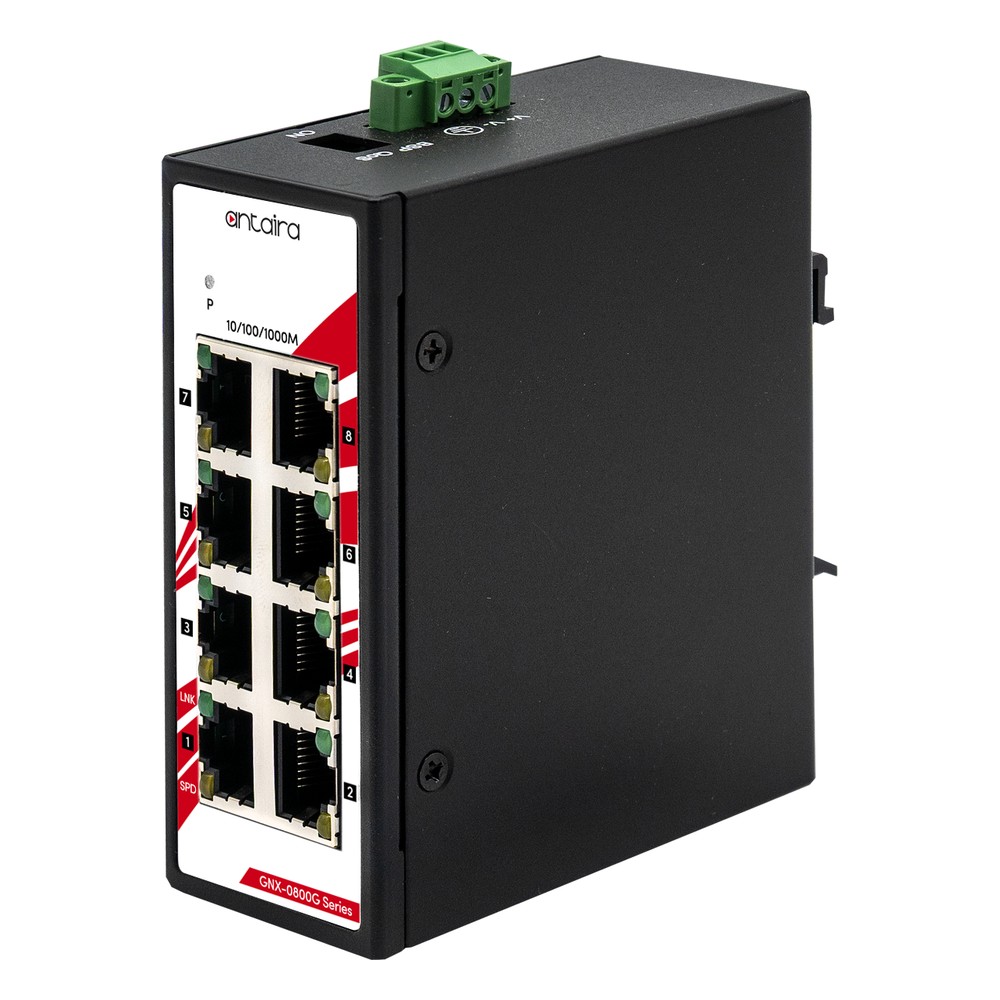
8-Port Gigabit Unmanaged DIN Rail Switch
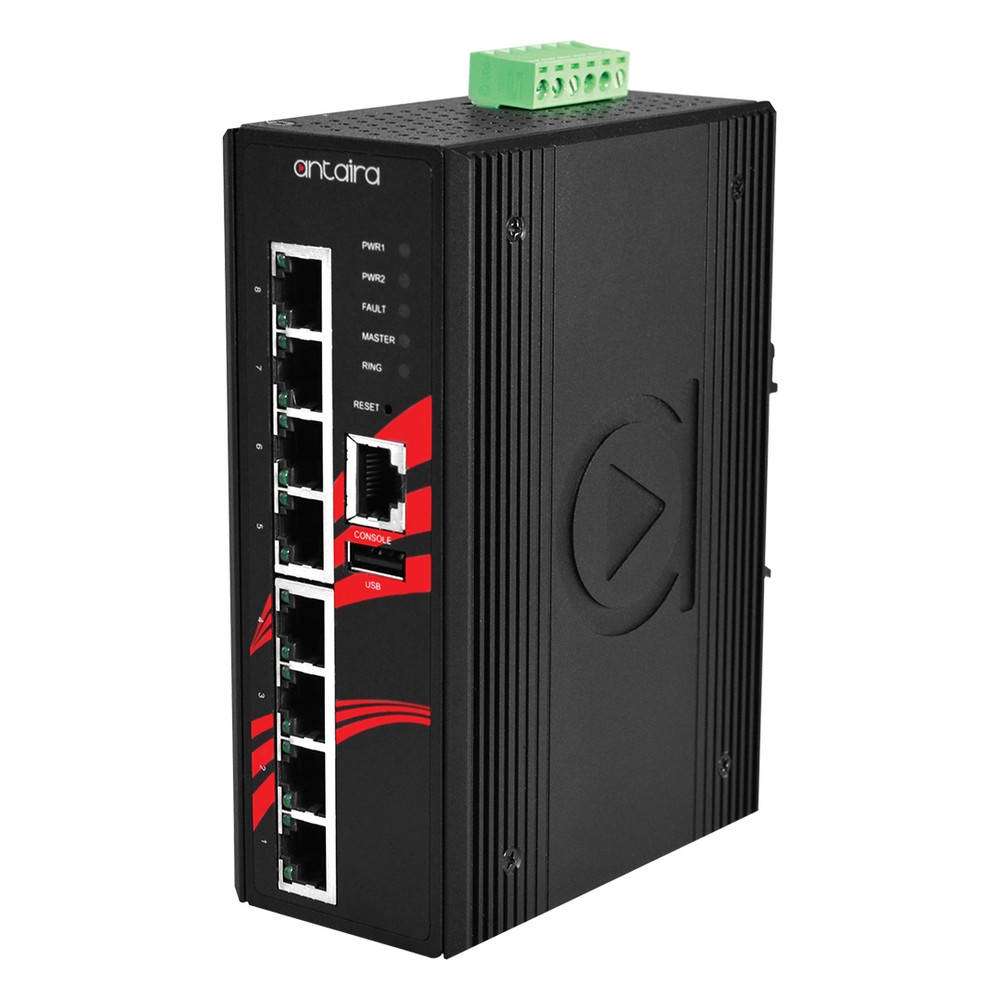
8-Port Gigabit Managed Industrial Ethernet Switch
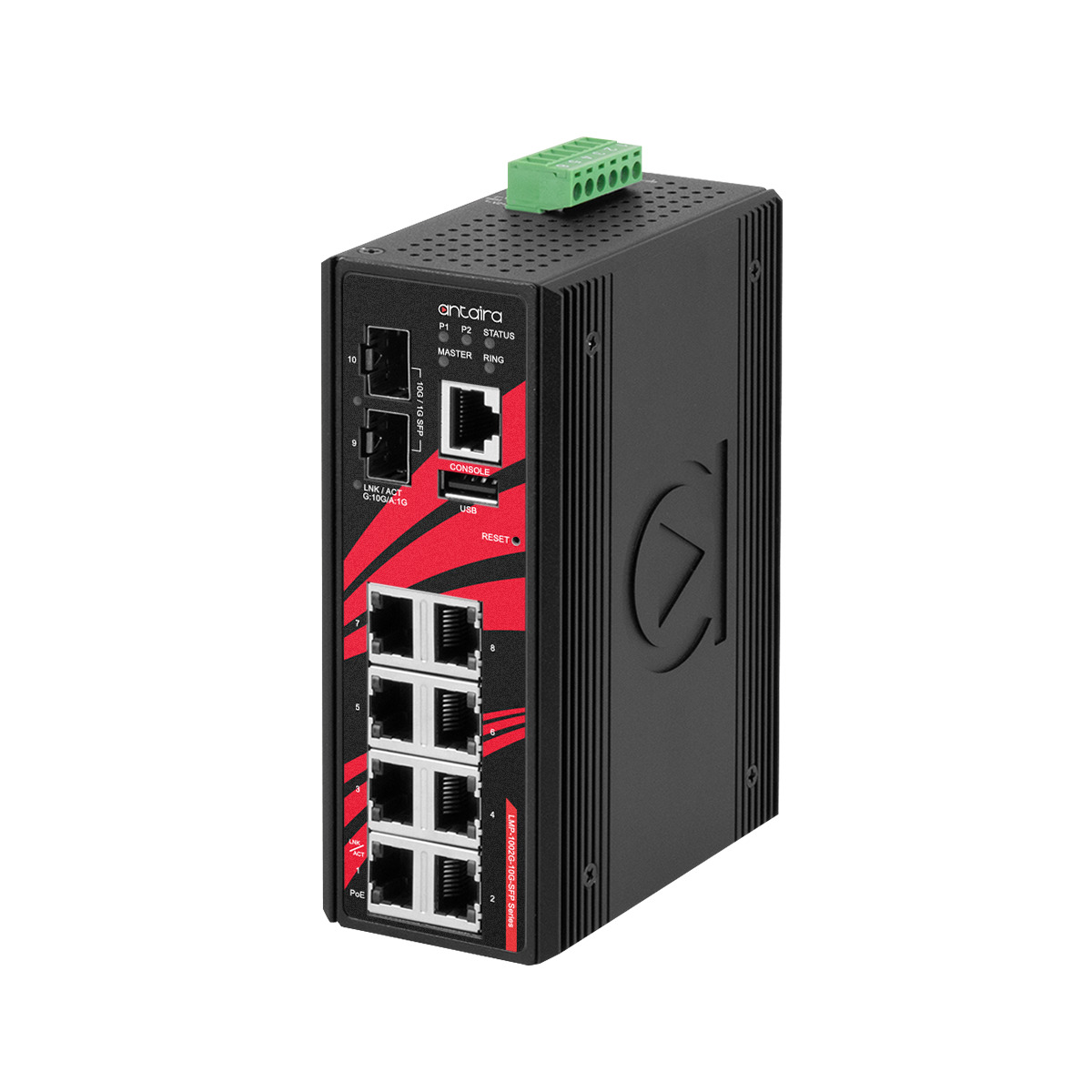
10-Port Industrial Gigabit PoE+ Managed Switch with 2x 10G SFP+ Uplinks
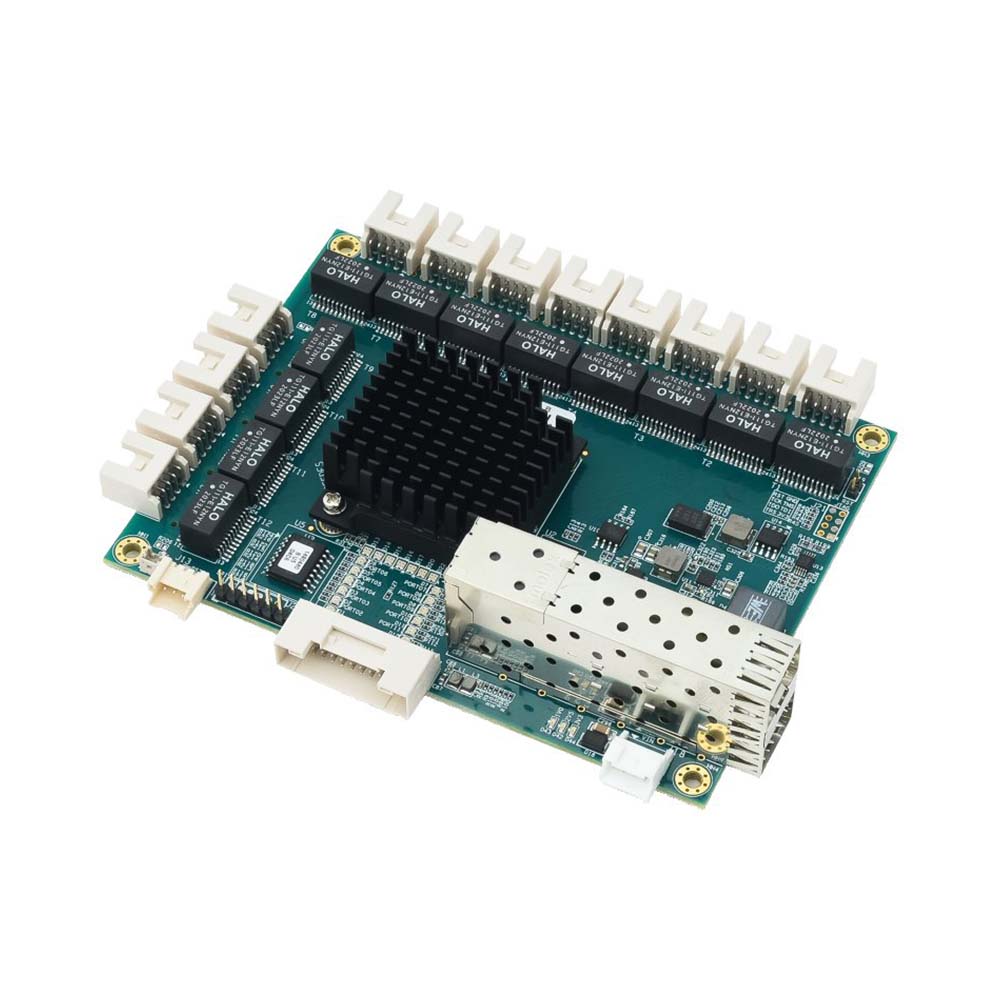
Layer 2+ 12 Port Managed Ethernet Switch Board with Dual 1/2.5 Gigabit SFP
Answer these seven questions and the managed or unmanaged choice usually makes itself.
If control, video and business traffic share the network, you need VLANs, so choose managed.
If one failed link or switch is unacceptable, you need RSTP or a ring protocol, so choose managed.
If a fault should be diagnosed without a site visit, you need SNMP and diagnostics, so choose managed.
If cameras, PTP or EtherNet/IP I/O run on the network, you need IGMP snooping, so choose managed or a smart switch with it.
If timing or control must arrive on schedule under load, you need QoS, and possibly TSN, so choose managed.
If ports, devices or sites will be added, a managed switch gives you headroom to segment and scale.
A rugged unmanaged switch is the simpler, lower-risk answer.
Quick answers
Control and visibility. An unmanaged switch forwards traffic with fixed settings; a managed switch adds VLANs, QoS, redundancy, monitoring and security that you configure.
If the network must be segmented, resilient or monitored, yes. A small fixed network with one purpose and no remote monitoring usually does not.
No. Both run at the speed of their ports. A managed switch can keep a busy network responsive by prioritising and filtering traffic.
A lightly managed switch. It offers a subset of managed features, usually VLANs and basic QoS through a web page, without the full redundancy and security set.
Yes, at the edge. Use an access port in one VLAN, keep it out of rings and loops, and accept that devices behind it are not monitored individually.
A plug-and-play switch with no settings. Every port is in one network and frames are forwarded on a best-effort basis.
For small, fixed, single-purpose networks. A few devices in one cabinet, with no need for segmentation, failover or remote monitoring, are a good fit.
A managed switch is an Ethernet switch you can configure, through a web interface, command line or SNMP, to set up VLANs, quality of service, redundancy and monitoring. An unmanaged switch is plug-and-play with no settings at all. Managed switches suit networks that are segmented, critical or monitored remotely.
An Ethernet switch is a networking device that connects computers, cameras, controllers and other equipment on a local network. It learns the address of each connected device and forwards every frame only to the port it is meant for, so many devices can communicate at full speed at the same time.
A network hub repeats every incoming frame out of all its other ports, so connected devices share one half-duplex link and its bandwidth. A switch learns which device sits on which port and forwards each frame only to its destination, giving every port full-duplex bandwidth. Hubs are obsolete, and switches have replaced them.
A VLAN (virtual LAN) is a logical segment of a network created in a managed switch. Using IEEE 802.1Q tags, it separates traffic into independent broadcast domains over the same physical wiring, so devices behave as if they are on separate networks.
RSTP (Rapid Spanning Tree Protocol) is the faster version of Spanning Tree Protocol, first published as IEEE 802.1w. It keeps redundant Ethernet links loop-free like STP, but neighbouring switches negotiate directly instead of waiting on timers, so recovery after a link failure typically takes around a second or less instead of 30 to 50 seconds.
IGMP snooping is a switch feature that listens to the IGMP messages hosts send when they join or leave a multicast group. The switch records which ports want each group and forwards multicast traffic only to those ports, instead of flooding every port like a broadcast. It keeps multicast video and control traffic off links that do not need it.
SNMP (Simple Network Management Protocol) is the standard way to monitor and manage networked devices. A manager polls agents on switches, routers, UPSs and computers for values held in a MIB, such as port status, traffic and temperature, and agents send traps when something changes. It runs over UDP: port 161 for polling, 162 for traps.
Tell us the devices, the traffic types, the redundancy and monitoring you need and the environment. We will recommend managed or unmanaged switches to suit, and can pre-configure IP addressing, VLANs and ring settings before delivery.