
 US
US 
Robot Computer Guide: Choosing Onboard Compute for AMRs, Humanoids and Cobots
The robot computer runs perception, planning and AI models on board, while real-time and safety controllers keep the machine in check. How the stack splits, the sensor and control I/O, Jetson Orin vs Thor vs IGX, power on a battery and sizing by robot class.
A robot computer is the onboard computer that turns a robot’s sensor data into decisions: it runs perception, localization, planning and, increasingly, large AI models, and it hands motion commands to the controllers that drive the motors. In an autonomous mobile robot, a humanoid, a cobot cell or a mobile manipulator, it is the part of the machine that decides what happens next, while separate real-time and safety controllers make sure it happens safely.
Choosing it has become harder as robots have moved from scripted motion to physical AI. A warehouse robot that once followed reflectors now fuses cameras and lidar, and a humanoid robot may run a vision language action model on board. The compute choice now ranges from a 7 W Jetson Orin Nano to a Jetson Thor module rated at up to 2,070 FP4 TFLOPS, and the I/O, power and safety questions around it matter as much as the processor.
This guide is the reference view. It walks through the robot software stack and where each layer runs, the sensor and control interfaces, how Jetson Orin, Jetson Thor and IGX differ, the split between AI, real-time and safety controllers, power and ruggedness on a battery-powered machine, the software, and how to size the computer by robot class. For the controller that drives an arm’s joints, see our explainer on the robot controller; for the difference between guided and autonomous vehicles, start with AGV vs AMR.
Key takeaways
- 01One computer thinks, others act
- The robot computer runs perception, planning and AI models. Joint loops and safety functions usually run on separate real-time controllers that keep working if the AI computer stalls.
- 02I/O decides as much as TOPS
- Camera links, lidar Ethernet, CAN FD to the drives and time synchronization often narrow the shortlist before processing power does.
- 03Orin, Thor or IGX
- Jetson Orin suits most AMRs and cobot cells, Jetson Thor suits humanoids and mobile manipulators running large models, and IGX adds functional safety features and a long support window.
- 04Safety is a system property
- No computer makes a robot safe on its own. Certified safety controllers, scanners and the risk assessment carry the safety case; the AI computer supports it.
- 05Battery, heat and vibration
- On a mobile robot the computer draws from the traction battery, sits in a closed body and rides over floor joints, so power, cooling and mounting need sizing like the compute.
How a robot computer turns sensor data into motion
Every autonomous robot, from a small AMR to a humanoid, runs the same loop. The robot computer owns the middle three steps; the first and last sit closer to the hardware.
-
Sense
Cameras, lidar, IMUCameras, lidar, radar, an inertial measurement unit, wheel encoders and joint sensors stream data in, time-stamped against a common clock.
-
Perceive
Detection and depthNeural networks detect people, pallets and obstacles, estimate depth and segment the scene, usually on the GPU and accelerators.
-
Localise
Maps and poseSLAM and localization fuse lidar, cameras, odometry and the IMU to work out where the robot is and update its map.
-
Plan
Paths and tasksPlanners choose a path, a grasp or the next action. On newer robots a foundation model may propose the action from images and an instruction.
-
Act
Controllers and drivesVelocity, trajectory or joint targets go over CAN FD, EtherCAT or Ethernet to motor drives, which close the fast control loops themselves.
Where each layer of the robot stack runs
The rates below are typical orders of magnitude rather than fixed figures, but they show why one computer rarely does everything. The robot computer is built for throughput; the layers at the bottom of the table need guaranteed timing instead.
| Layer | Typical rate | Where it usually runs | What it needs |
|---|---|---|---|
| Sensor capture and sync | Camera frame rate, often 30–60 Hz; IMU hundreds of Hz | Robot computer (camera interfaces, ISP) | Frames must arrive with accurate timestamps for fusion to work |
| Perception | Per frame, 10–60 Hz | Robot computer GPU, DLA or PVA | The heaviest AI load; scales with camera count and resolution |
| Localization and mapping | 10–100 Hz | Robot computer CPU and GPU | Needs lidar, odometry and IMU on one clock |
| Planning and behavior | 1–20 Hz | Robot computer CPU, plus GPU for learned policies | Latency matters, but not to the microsecond |
| Foundation and VLA models | Typically a few Hz | Robot computer GPU, large memory | Memory size and bandwidth decide which models fit |
| Motion and whole-body control | Hundreds of Hz to 1 kHz | Real-time core, controller or the robot computer with a real-time kernel | Needs bounded latency, not peak throughput |
| Joint and servo loops | Several kHz | Motor drives and MCUs | Hard real time; stays off the AI computer |
| Safety functions | Continuous, certified response time | Safety controller, safety-rated scanners and drives | Must work even if the robot computer fails |
Read down the table and the split becomes clear. Everything above motion control is a throughput problem that suits a GPU-heavy computer. Everything below it is a timing problem that suits a microcontroller, a drive or a certified safety device. The boundary between the two is where most integration work happens, and where most robot designs differ.
Where foundation models fit
Robots are starting to run models that map camera images and a spoken or written instruction straight to actions. A vision language action model usually runs at a few actions per second and hands its output to a faster controller that smooths and executes it. These models are trained in simulation and from demonstrations, using imitation learning and reinforcement learning, then run on the robot. Training happens in the data centre; the robot computer only runs inference, but it needs the memory to hold the model and the bandwidth to feed it.
Sensor and control I/O on a robot computer
On most robot projects the interfaces narrow the shortlist before processing power does. The table lists the common links, what they carry and what to check on the computer. Treat the rates as typical values; the camera, lidar or drive datasheet has the final word.
| Interface | Carries | Typical rate | What to check |
|---|---|---|---|
| GMSL2 | Automotive cameras over coax | Around 6 Gbps per link forward | Connector type (FAKRA, mini FAKRA), camera driver support, power over coax |
| MIPI CSI-2 | Cameras on a short ribbon or board-to-board link | Several Gbps per lane group | Lane count on the module, cable length is short |
| GigE Vision and 10GbE | Industrial cameras, stereo cameras | 1, 2.5, 10 or 25 Gbps | PoE budget, switch or direct ports, PTP support |
| Ethernet lidar | 3D point clouds, often with PTP or PPS | Typically up to 1 Gbps per sensor | Port count, time sync, M12 connectors on mobile robots |
| IMU | Acceleration and rotation | Hundreds of Hz over SPI, UART or USB | Timestamping and mounting close to the robot’s centre |
| CAN FD | Motor drives, battery management, sensors | Up to 64-byte frames, faster data phase than classic CAN | Isolation, termination, Linux SocketCAN driver |
| EtherCAT | Servo drives and I/O on arms and humanoids | Cycle times often in the sub-millisecond range | A real-time master, usually on a dedicated core or controller |
| Digital I/O and serial | E-stop status, brakes, lights, legacy devices | Low rate | Isolation and voltage levels |
| PPS and PTP | A common clock for all sensors | IEEE 1588 or 802.1AS | Hardware timestamping on the Ethernet ports |
Cameras: GMSL2, MIPI CSI-2 or Ethernet
GMSL2 is the usual choice on mobile robots because it carries video, control and power over one locking coax cable several meters long, and the serializer sits at the camera. MIPI CSI-2 is the camera interface on the Jetson module itself, so it suits cameras mounted close to the computer, and GMSL2 deserialisers convert to it on the carrier board. Ethernet cameras, including GigE Vision cameras, suit fixed cells and longer runs, and PoE powers them from the same cable. Our guide to GMSL technology goes further on links and serialisers.
A worked camera bandwidth example
Say a mobile manipulator carries eight 1920 × 1080 cameras at 30 frames per second in a 16-bit YUV format. Each camera produces about 62 million pixels a second, or roughly 1 Gbps, so the eight together need about 8 Gbps into the computer before any processing. That fits comfortably on eight GMSL2 links, but it is a real load on memory bandwidth once each frame is copied, resized and fed to several networks. Raw or compressed formats change the figure a lot, so work it out for your own cameras.
Lidar, IMU and time synchronization
Sensor fusion only works when every reading carries an accurate timestamp. Most 3D lidar connects over Ethernet and takes its time from PTP or a GPS-style PPS pulse, and an IMU needs timestamping close to the sensor. Ports with hardware timestamping let the computer act as the time master for the whole robot. Our guides to IEEE 1588 PTP and sensor fusion cover the detail.
Drives and actuators: CAN FD and EtherCAT
Wheel drives, battery management systems and many robot joints talk CAN bus or its faster successor CAN FD, which carries up to 64 bytes per frame. On Linux the ports appear through SocketCAN, and isolated ports protect the computer from ground differences between the battery and the drive electronics. Arms and humanoids with many joints more often use EtherCAT, which needs a master with tight, repeatable timing; that usually means a dedicated core with a real-time kernel or a separate motion controller.
Choosing between Jetson Orin, Jetson Thor and IGX
Most robot computers sold today are built on an NVIDIA Jetson module, because it combines an Arm CPU, a GPU, AI accelerators, camera interfaces and a mature robotics software stack in one low-power part. The table summarizes NVIDIA’s published module figures. Orin figures are sparse INT8 TOPS and Thor figures are sparse FP4 TFLOPS, so the two columns are not directly comparable: NVIDIA rates the Thor series at up to 7.5 times the AI compute of AGX Orin.
| Module | AI performance (NVIDIA, sparse) | CPU and memory | Module power | Typical robot |
|---|---|---|---|---|
| Jetson Orin Nano 8GB | 40 TOPS (67 TOPS in Super mode) | 6-core Arm Cortex-A78AE, 8 GB | 7–15 W (up to 25 W Super) | Small AMRs, delivery robots, education and research |
| Jetson Orin NX 16GB | 100 TOPS (157 TOPS in Super mode) | 8-core Arm Cortex-A78AE, 16 GB | 10–25 W (up to 40 W Super) | AMRs with 2–4 cameras and 2D or 3D lidar |
| Jetson AGX Orin 64GB | 275 TOPS | 12-core Arm Cortex-A78AE, 64 GB | 15–60 W | Warehouse and outdoor AMRs, cobot cells, 6–8 cameras |
| Jetson T4000 | 1,200 FP4 TFLOPS | 12-core Arm Neoverse-V3AE, 64 GB LPDDR5X | 40–70 W | Mobile manipulators and multi-camera robots running larger models |
| Jetson T5000 | 2,070 FP4 TFLOPS | 14-core Arm Neoverse-V3AE, 128 GB LPDDR5X | 40–130 W | Humanoids and robots running VLA and language models on board |
| IGX Thor | 2,070 FP4 TFLOPS on the module; up to 5,581 with a discrete GPU | 14-core Arm Neoverse-V3AE, 128 GB LPDDR5X | 40–130 W module; more with a discrete GPU | Safety-critical robotics, medical robots, high-bandwidth sensor processing |
For most AMRs, cobot cells and inspection robots, Jetson Orin is still the sensible starting point: it is mature, widely supported by camera and carrier board makers, and an Orin NX or AGX Orin covers several cameras, lidar and the usual perception networks. Jetson Thor earns its place when the robot runs large transformer models, many high-resolution cameras or several workloads at once, and its 25GbE networking and 128 GB of memory matter as much as the headline figure. Our white paper on Jetson Thor vs AGX Orin covers the step in detail, Jetson T5000 vs T4000 compares the two Thor modules, and our guide to choosing a Jetson module sizes the whole range.
IGX and functional safety
IGX is NVIDIA’s industrial and medical edge AI range. IGX Orin pairs an AGX Orin-class processor with a separate safety microcontroller, and IGX Thor uses a functional safety island on the Thor processor, which NVIDIA describes as designed to meet ISO 26262 and IEC 61508. IGX boards add ConnectX networking, discrete GPU options, a board management controller and, for IGX Orin, support until 2033. NVIDIA positions the IGX Thor Developer Kit Mini as its development kit for robotic safety.
That makes IGX the better fit when the robot computer itself has to take part in the safety architecture, or when a long, fixed support window matters more than size and power. It does not make a robot safe on its own: the certified safety functions, the drives and the risk assessment still carry the safety case. Many IGX systems are mains-powered boards with large discrete GPUs, which suits fixed cells, surgical robots and carts better than battery-powered mobile robots.
x86 with a discrete GPU
Some AMR builders prefer an Intel or AMD computer with an NVIDIA RTX graphics card, usually because their software stack is built for x86, they need Windows, or they want to swap GPUs over the product’s life. It typically costs more power and space than a Jetson for the same AI throughput, but it is a valid choice, and several AMR computers combine a Core processor, a GPU slot, GMSL2 inputs and CAN in one chassis.
Real time and safety: what the robot computer should not do alone
If the robot computer froze for half a second, would anyone or anything get hurt? If the answer is yes, the function at risk belongs on a controller that is designed and certified for it, not on the AI computer.
Jetson Linux is a general-purpose operating system. JetPack offers a real-time kernel option that tightens latency for motion control, but GPU workloads, memory pressure and software updates can still delay a thread. The usual answer is a layered design in which the robot computer decides, a real-time controller executes, and a safety controller can stop everything regardless of what the robot computer is doing.
| Function | Usually runs on | Typical requirement |
|---|---|---|
| Perception, planning, AI models | Robot computer (Jetson, IGX or x86 with GPU) | Not safety-rated in most designs; monitored by the layers below |
| Motion and trajectory control | Real-time core, motion controller or robot controller | Bounded latency; often EtherCAT or CAN FD master |
| Joint loops, current control, safe torque off | Motor drives | Safety functions such as STO rated in the drive |
| Protective stop, speed and separation monitoring | Safety PLC or safety controller with safety-rated scanners | Designed to ISO 13849-1 performance levels or IEC 61508 / IEC 62061 SIL |
| Health monitoring of the robot computer | Watchdog in the computer and heartbeat to the safety controller | Stops the robot safely if the AI computer stops responding |
The standards depend on the robot. Industrial arms and cobots are covered by ISO 10218, with collaborative operation guidance that is set out in our explainer on cobot safety standards. Driverless industrial trucks, including most AMRs, fall under ISO 3691-4, and functional safety design usually follows ISO 13849-1 or IEC 61508. Standards for legged and humanoid robots are still being developed. We are hardware specialists, not safety assessors: choosing computers and controllers with the right features supports a safety case, but the risk assessment and certification belong to the robot builder and their notified body.
Our case study on Jetson computers for safe human-robot collaboration shows the AI computer adding person detection alongside, not instead of, the certified safety system.
Power, heat and vibration on a mobile robot
Power from the traction battery
On a mobile robot the computer shares the battery with the drives, so every watt it uses shortens the shift. Module power ranges on their own understate the load: cameras powered over coax or PoE, lidar, wireless modules and the carrier board all add to it.
Say a mobile robot carries a 2 kWh battery and the computer, with its cameras, averages 60 W. Over an 8-hour shift the computer alone uses 480 Wh, about a quarter of the pack. Dropping the average to 30 W with a smaller module or a lower power mode saves more than an hour of drive time. Measure your own duty cycle, because perception load and power modes change the average a lot.
DC input, ignition and hold-up
Look for a wide DC input that covers the battery’s full charge range plus transients, such as 9–36 V, 9–50 V or 19–36 V depending on the pack. Ignition control lets the computer start and shut down cleanly with the robot’s key switch or power relay, and a supercapacitor UPS can hold it up long enough to close files when the battery is swapped. NVMe drives with power loss protection protect maps and logs against sudden loss of power.
Cooling in a closed body
Robot bodies are often sealed, so the computer has to reject heat into a small enclosure. A Jetson module running at 60 W or more usually needs a heatsink coupled to the chassis or a fan, and a computer rated for 60 °C with airflow can throttle in a warm body without it. Our Jetson thermal design guide and our explainer on thermal throttling cover the design rules.
Shock, vibration and ingress
Floor joints, dock plates and outdoor terrain put steady vibration and repeated shocks through the robot. Locking connectors such as M12 and FAKRA, soldered or screwed-down memory and storage, and a chassis tested against MIL-STD-810H or a similar vibration profile all help. Outdoor and washdown robots need sealing, and an IP67 enclosure removes the need for a separate box around the computer.
Software: JetPack, ROS 2 and Isaac
The software stack often decides the hardware family. On Jetson, JetPack bundles Jetson Linux, CUDA, TensorRT and the camera and multimedia libraries; Jetson Thor uses JetPack 7, and our white paper on JetPack 7.2 and Yocto on Jetson Orin covers production images. Most robot builders run ROS 2 on top, with NVIDIA Isaac ROS packages that move perception, stereo depth and visual odometry onto the GPU. Our guide to the ZED ROS 2 wrapper on Jetson is a worked example of a stereo camera in ROS 2.
For high-bandwidth sensors, NVIDIA Holoscan and the Holoscan Sensor Bridge stream camera and sensor data over Ethernet straight into GPU memory, which suits robots with many cameras on Jetson Thor or IGX. Models are usually optimized with TensorRT before deployment, and many teams run vision language models and VLA policies in containers so they can be updated independently of the operating system.
Plan the fleet side early. Remote updates, logging and health monitoring matter more on a hundred robots than on one, and our explainer on AMR fleet management covers the software around the robot. Check the support window too: our answer on how long NVIDIA Jetson is supported sets out module lifecycles, which matter for a robot that will be built for five years or more.
Hardware for robot compute
Each part of the robot’s compute and sensing chain has a hardware category of its own, from the AI computer to the cameras and the bus to the drives.

Jetson Thor computers
Blackwell-based computers and carrier boards for humanoids, mobile manipulators and robots running large models on board.
View range
Jetson AGX Orin computers
Up to 275 TOPS for multi-camera AMRs, outdoor robots and cobot cells.
View range
Rugged Jetson computers
Sealed, wide-temperature Jetson systems with locking connectors for robots that work outdoors or in dirty sites.
View range
GMSL cameras
Automotive-style cameras on locking coax for surround view and depth on moving machines.
View range
Holoscan Sensor Bridges
Bring cameras and sensors in over Ethernet with synchronized timing for Jetson Thor and IGX.
View range
CAN bus I/O modules
Add CAN channels or bridge CAN to Ethernet for drives, battery systems and sensors.
View rangeSizing a robot computer by robot class
The right computer depends on how many sensors the robot carries, which models it runs and where it works. The table gives typical starting points by robot class with an example from our range for each; the final choice depends on your sensor list, software and power budget.
| Robot class | Typical sensors | Compute class | Example from our range | Why it fits |
|---|---|---|---|---|
| Small AMR or AGV upgrade | 2–4 cameras, 2D lidar, CAN to the drives | Jetson Orin Nano or Orin NX | Advantech MIC-713-OX | Orin NX up to 157 TOPS in Super mode, CAN FD with switchable termination, four isolated inputs and outputs, optional GMSL card, 9–36 V DC |
| Warehouse AMR with camera ring | 4 GMSL cameras, 3D lidar, CAN FD | Jetson Orin NX | Vecow EAC-6100-R16 | Orin NX 16GB, four GMSL inputs on Fakra-Z, CAN FD, 9–50 V DC with ignition control, −20 to 70 °C in 15 W mode |
| Outdoor or washdown mobile robot | 8 cameras, lidar, sealed I/O | Jetson AGX Orin | Vecow RAC-1000-R64 | AGX Orin 64GB at up to 275 TOPS, eight GMSL inputs, two isolated CAN FD, IP67 with M12 I/O, 9–50 V DC |
| Cobot cell or vision-guided arm | Ethernet or PoE cameras, PLC signals | Jetson AGX Orin | Advantech MIC-733-AO | AGX Orin 32GB or 64GB, four GbE with optional PoE, isolated digital I/O, optional PCIe x8 slot for a frame grabber |
| Mobile manipulator or humanoid | 8–16 GMSL cameras, lidar, many joints | Jetson T5000 | Advantech MIC-742-AT-T5000 | Jetson T5000 with 128 GB, four 25GbE links on QSFP28, four CAN FD, optional eight-channel GMSL2, 19–36 V DC |
| Surround-view autonomous machine | 16 GMSL cameras, 10GbE lidar, vehicle bus | Jetson T5000 | Vecow EAC-7200F-T5000 | 16 GMSL inputs, two 10GbE, four isolated CAN-FD, MIL-STD-810G shock and vibration, 9–50 V DC |
| AMR on an x86 software stack | 4 GMSL2 cameras, PoE+ cameras, CAN | Intel Core with RTX GPU | Neousys Nuvo-9154GC | Intel 12th to 14th Gen Core, 150 W RTX GPU slot, four GMSL2 inputs, two CAN 2.0, 8–48 V DC, MIL-STD-810H shock and vibration |
| Fixed safety-critical or medical robot | Many sensors over Ethernet, discrete GPU | IGX Thor | Yuan NEAR T7X | IGX Thor T7000 with optional RTX PRO 6000 Blackwell GPU, two 100Gb QSFP112, Holoscan Sensor Bridge support, AC input for fixed installations |
What else to check
Count the camera links before the TOPS: a robot with eight GMSL2 cameras needs eight deserialiser channels on the carrier board or a frame grabber, and the module’s camera interfaces set a ceiling. Check CAN FD port count and isolation against the drives and battery system, Ethernet ports against lidar and uplinks, and the DC input against the battery’s full voltage range. Our explainers on what TOPS means and Jetson Super mode help translate the headline figures, and our article on the Vecow EAC-7000 Jetson Thor robot computer looks at one Thor-based design in detail.
Our wider ranges of NVIDIA Jetson computers and edge AI computers cover more module, port and enclosure combinations, and our autonomous and unmanned systems page shows where they are used. We configure every robot computer with JetPack or the operating system you need, camera drivers, storage, wireless modules and antennas, then test it before it ships.
Robot computers on Jetson Orin and Jetson Thor
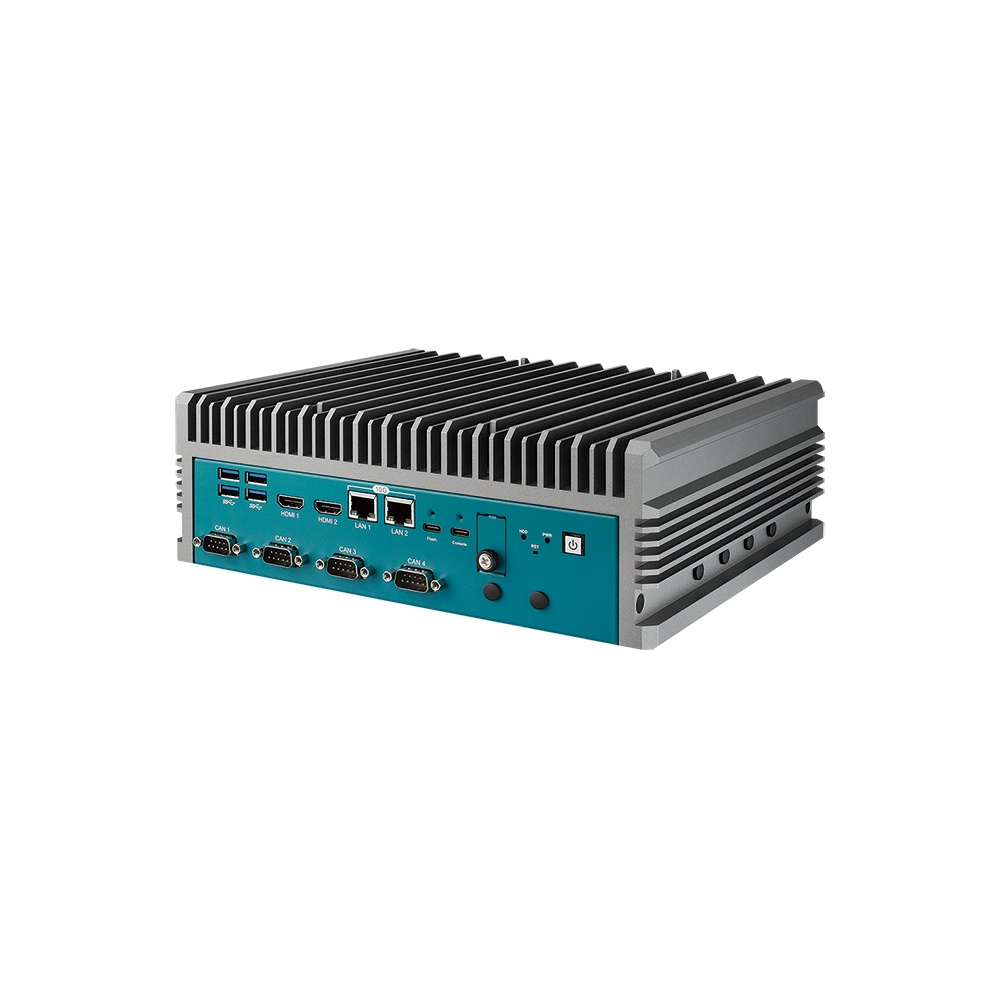
Four starting points from the table above: an Advantech Jetson T5000 robotics computer with 25GbE and CAN FD, a 16-camera Jetson Thor computer, an IP67 AGX Orin computer with eight GMSL inputs, and a compact Orin NX robotics computer.
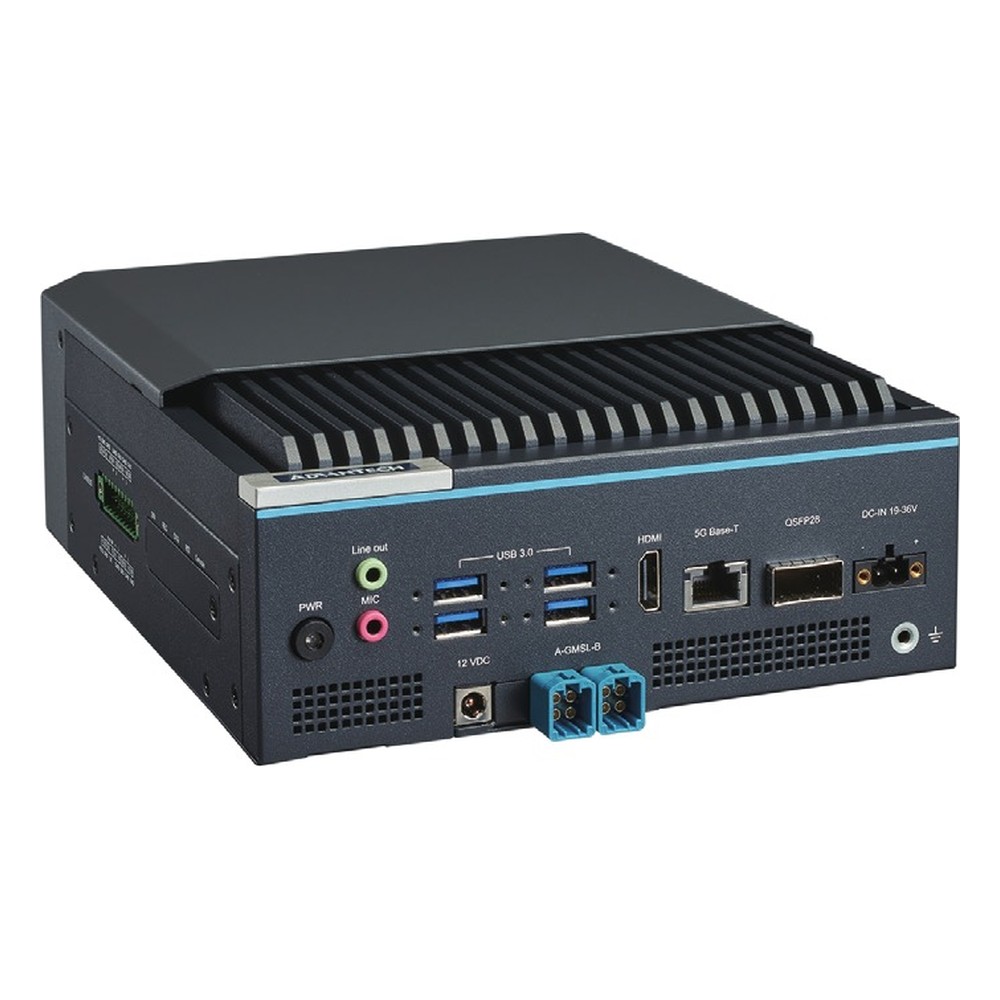
NVIDIA Jetson Thor T5000 Industrial AI Computer with 4x 25GbE QSFP28, 4x CAN FD and 8-Channel GMSL2 Option
- AI
- 2,070 TOPS
- SOM
- NVIDIA Jetson T5000
- Ethernet
- 4× 25GbE, 1× 5GbE
NVIDIA Jetson Thor T5000 Robot Computer with 16x GMSL, 10GbE and CAN-FD
- AI
- 2,070 TOPS
- SOM
- NVIDIA Jetson T5000
- Cameras
- 16× GMSL
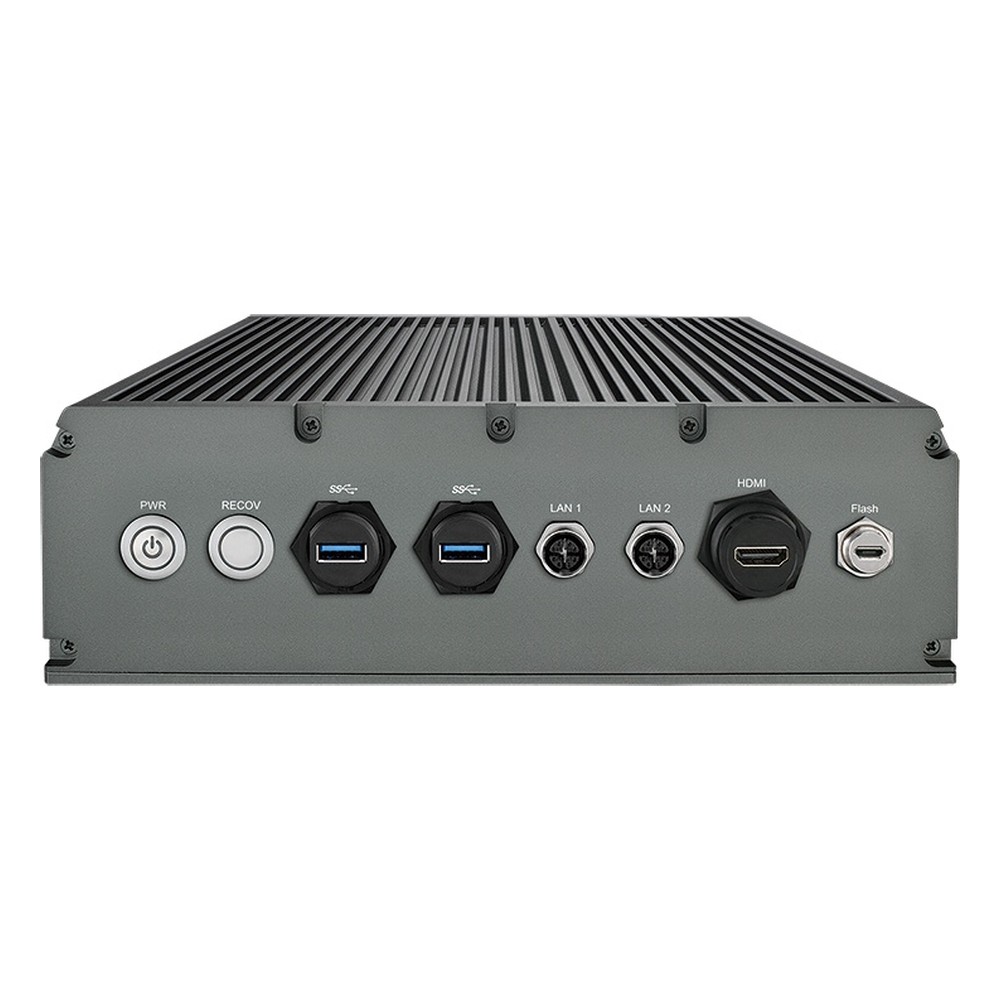
NVIDIA Jetson AGX Orin 64GB IP67 Waterproof Computer with 275 TOPS, 8 GMSL Cameras and 9-50V DC
- AI
- 275 TOPS
- SOM
- NVIDIA Jetson AGX Orin 64 GB
- Cameras
- 8× GMSL
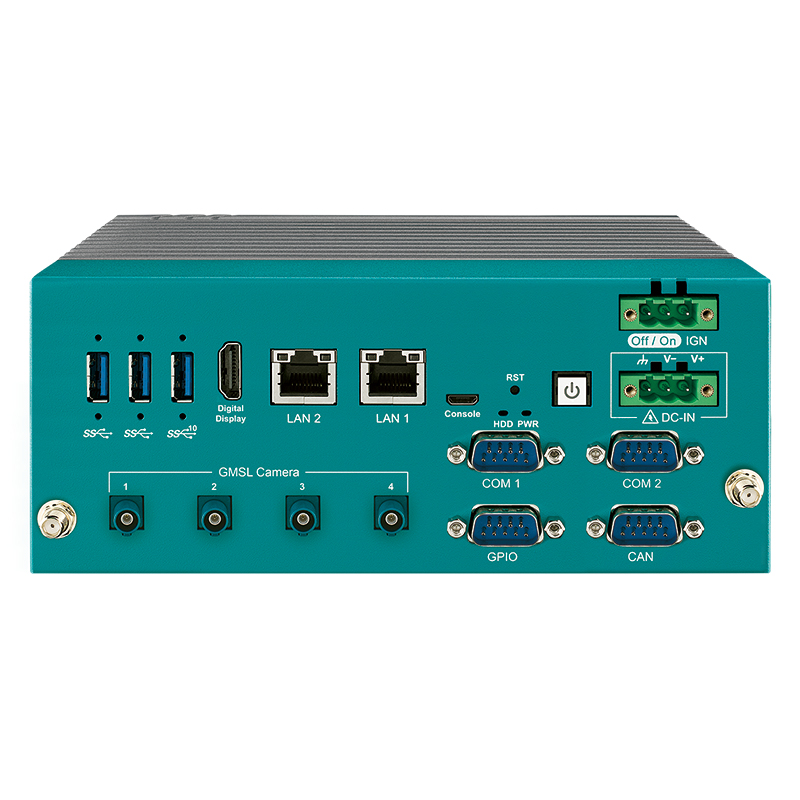
NVIDIA Jetson Orin NX 16GB Robotics Computer with 4x GMSL Cameras
- AI
- 100 TOPS
- SOM
- NVIDIA Jetson Orin NX 16 GB
- Cameras
- 4× GMSL
Specifying a robot computer
Eight checks that decide whether the computer fits the robot or becomes the part that limits it.
-
01
Sensor list
List every camera, lidar, radar and IMU with its interface, resolution and rate, and add up the bandwidth.
-
02
Models and workloads
List the networks and models that run at once, with their memory needs, and benchmark them on the target module where you can.
-
03
Control interfaces
Match CAN FD, EtherCAT, serial and digital I/O to the drives, battery system and safety controller, including isolation.
-
04
Real-time split
Decide which loops run on the robot computer, which on a real-time controller and which on the drives.
-
05
Safety architecture
Agree the safety functions, the controllers that carry them and the standards that apply before choosing the computer.
-
06
Power budget
Add the computer, cameras, lidar and radios, check the battery voltage range and plan clean shutdown.
-
07
Environment
Check the temperature inside the robot body, vibration, ingress and connector types for the worst site the robot will see.
-
08
Software and lifecycle
Fix the JetPack or OS version, ROS 2 distribution and update method, and check the module’s support window against the product life.
Robot computers: common questions
Quick answers
What is a robot computer?
The onboard computer that runs perception, planning and AI. It processes camera, lidar and other sensor data, works out where the robot is and what to do, and sends commands to the motor controllers. Fast joint loops and safety functions usually run on separate controllers.
Is a robot computer the same as a robot controller?
Not usually. A robot controller drives an arm’s joints with hard real-time loops. A robot computer runs the AI and decision-making above it. Some designs combine the two, but most keep them separate.
Which NVIDIA Jetson is best for robotics?
It depends on sensors and models. Jetson Orin NX suits small AMRs with a few cameras, AGX Orin suits multi-camera and outdoor robots, and Jetson Thor suits humanoids and mobile manipulators running large models on board.
What is the difference between Jetson Thor and IGX Thor?
IGX adds safety and industrial features. Both use the Thor processor. IGX Thor exposes its functional safety island, adds ConnectX networking, a board management controller and discrete GPU options, and targets industrial and medical systems with longer support.
Can a Jetson run real-time robot control?
Some of it, with care. A real-time kernel and a dedicated CPU core can run motion control at hundreds of hertz. Servo loops and safety functions should stay on drives, microcontrollers and certified safety controllers.
Is Jetson Thor certified for functional safety?
The computer alone does not make a robot safe. NVIDIA describes the Thor safety island as designed to meet ISO 26262 and IEC 61508, and IGX exposes it. Certification applies to the complete robot and its safety functions, not to a computer on its own.
How much power does a robot computer use?
From under 10 W to well over 100 W. An Orin Nano module runs at 7–15 W and a Jetson T5000 module at 40–130 W. Cameras, lidar, radios and the carrier board add to that, so measure the whole system.
Do humanoid robots need Jetson Thor?
Not always, but it is the common choice. Humanoids that run vision language action models and many cameras on board need large memory and GPU throughput. Simpler or teleoperated humanoids can run on AGX Orin.
Robotics FAQs
-
What Is Physical AI?
Physical AI is artificial intelligence that senses the real world, reasons about it and acts in it through a machine such as a robot, vehicle or camera system. Its models are trained on GPU servers, tested in physics simulation and then run on a computer inside the machine, such as an NVIDIA Jetson module.
-
What Is a Humanoid Robot?
A humanoid robot is a robot built in roughly human form, usually with a head, a torso, two arms and two legs, so it can work in spaces and with tools designed for people. Modern humanoid robots use cameras, AI models and an onboard computer to walk, balance and handle objects.
-
What Is a Robot Controller?
A robot controller is the computer that runs a robot: it reads sensors, makes decisions and commands the motors. Industrial arms use the manufacturer’s motion controller, while mobile robots and vision-guided systems increasingly use an edge AI computer as the robotics controller, running camera perception, planning and communication with drives over CAN or Ethernet.
-
AGV vs AMR: What Is the Difference?
An AGV (automated guided vehicle) follows fixed routes marked by magnetic tape, wires, reflectors or floor codes, and stops when something blocks its path. An AMR (autonomous mobile robot) builds a map of its surroundings with sensors and plans its own route, steering around people and obstacles. AGVs suit stable, repetitive routes; AMRs suit changing layouts.
-
What Is an Autonomous Mobile Robot?
An autonomous mobile robot (AMR) is a robot that moves through a building or site on its own. It builds a map with lidar and cameras, works out where it is, plans a route and steers around people and obstacles, so it needs no tape, wires or fixed tracks. AMRs move goods, tow carts, clean, inspect and deliver.
-
What Is GMSL2?
GMSL2 (Gigabit Multimedia Serial Link 2) is a high-speed serial link that carries uncompressed camera video, power and control data over one coaxial cable of up to around 15 meters. Developed for automotive cameras, it is now widely used on robots, autonomous machines and drones with NVIDIA Jetson computers.
-
What Is NVIDIA Holoscan?
NVIDIA Holoscan is NVIDIA’s sensor-processing platform for real-time AI on streaming data at the edge. It combines the open-source Holoscan SDK, which builds low-latency pipelines from capture to inference to display, with the Holoscan Sensor Bridge for bringing camera and sensor data over Ethernet straight into GPU memory, on Jetson, IGX and x86 GPU systems.
Specifying a robot computer?
Tell us what the robot does, the cameras, lidar and drives it carries, the models you plan to run and the battery it runs from. We will recommend the computer, camera interfaces and I/O, then configure, image and test it before it ships.